Introduction
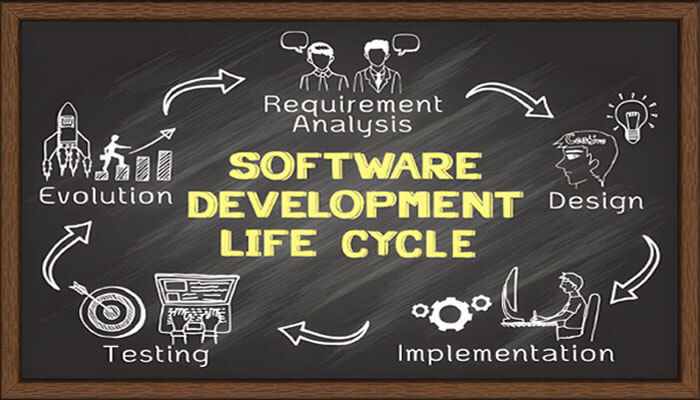
SDLC is the Software Development Life Cycle. It is also known as the System Development Life Cycle. The Software Development Life Cycle describes how to create and maintain a software product. It is a process for Requirement Gathering, Planning, Designing, Coding, Testing, Implementation, and Maintenance.
- Every software product starts with a request for the product by the customer
- The software life cycle can be considered as the business process for software development. And it is often referred to as a Software process. (SLCM-Software Life Cycle Model).
- Process models – It describes models in more detailed and precise life cycle activities.
- Different Stages in a Life Cycle Model
- Feasibility study stage
- Requirements analysis and specification.
- Planning
- Design
- Coding
- Testing
- Deployment and Maintenance.
- A Software Development Life Cycle is a series of identifiable stages. It describes how a software product changes its development.
- A Software Development Life Cycle is a descriptive and diagrammatic representation of the software life cycle.
- A life cycle model maps the different activities performed on a software product from its beginning to retirement into a set of life cycle phases.
7 Phases of Software Development Life Cycle (SDLC)
# Feasibility study
A feasibility study is going to assess the project plan or method. This is done by using various techniques like analyzing technical, economic, legal, operational, scheduling, and time feasibility factors. It is conducted mostly by Business Analysts, Project Managers, Architects, Accountants, Legal Teams, and Marketing Analysts based on the factors.
The Feasibility study specifies whether to continue, modify, or abandon the project.
Explore our complete guide to Document Management System (DMS) to learn its features, benefits, and best practices for secure digital document storage and workflow automation.
# Requirement Analysis and Specification
Collection of Requirements from the Client. It includes Design documents typically include functional hierarchy diagrams, screen layouts, business rules, process diagrams, pseudo-code, and a complete data model with a data dictionary. gathering information from the client, internal and external experts, and managers to understand their needs, objectives, and expectations for the project.
After the collection of requirements need to be analyzed based on the scope of the project. It is mostly conducted by Business Analysts, System Analysts, Product Owner and Product Managers.
Documents prepared include:
- BRS (Business Requirement Specification) -Business objectives and Stakeholder Requirements.
- FRS (Functional Requirement Specification) -Functional requirements.
- SRS (Software Requirement Specification) -Functional requirements and non-functional requirements.
- User Stories -simple description from the perspective of the end user.
Requirement documents are used to understand the project scope and requirements. It helps to ensure the satisfaction of all the parties involved in the project.
# Planning phase in Software Development Life Cycle
Planning is crucial for organizing and managing the project effectively in Software development. After gathering and documenting the requirements, the next phase typically involves project planning. It defines scope, objectives, timelines, resources, and budget. The project planning phase is the most challenging phase for a project manager. A project plan mostly includes Project Scope, Resource Allocation, Estimation Cost, Schedules, Risk Management, and Communication Plan.
Documents prepared include:
- Project Plan -Scope of the whole project.
# Design
Software requirements gathered in the Requirement analysis phase are transformed into a structured document. It plays a crucial role in developing the blueprint of the system. Design documents typically include functional hierarchy diagrams, screen layouts, business rules, process diagrams, database, security, and performance designs. It is done by the System Architect, UI/UX Designer, and Developers.
Documents prepared include:
- High-level Design (HLD) -Design related to the entire system. It concentrates on Flow charts, Decision tables, Flow Diagrams, Decision Trees etc.,
- Low-level Design (LLD) -Design related to the component level. It concentrates on the User Interface.
# Coding
Design specifications are transformed into Actual code. The team is going to build the functionality of the product. Developers write the code based on the design and requirement documents for a component, module, or feature using programming languages, programming tools like interpreters, compilers, debugger. Performing unit testing, Integration of different modules, reviewing code, and debugging the code are the activities done.
Documents prepared include:
- Source Code -Actual code written by developers.
- Code Review –Findings from feedback.
- Unit test -Validate individual component or feature.
- Change Log -Changes made in the code.
# Testing

After the development of the software, it is deployed in a testing environment. The team does testing with various methodologies to check whether the software is working as per the requirements or not. If you find any deviation, send it to the concerned team to fix the issues. It is done till software requirements are fulfilled. Software Testing can be done manually or through automation.
We can have different types of testing to free software from bugs. They are Unit Testing, Integration Testing, System Testing, Acceptance Testing, Regression Testing, Performance Testing, Security Testing, Usability Testing, Compatibility Testing, and many more.
Documents prepared include:
- Plan -Scope and Approach.
- Design -Test Scenarios and Test Cases.
- Script -Automation.
- Execution – Identify, detect, and log the defects.
- Closure – Summarizes the testing activities, results, and defects.
Read Verification and Validation in software engineering ensure you build the product right and build the right product through systematic testing, quality assurance, and requirement validation.
# Deployment and Maintenance
Deployment is done when the software meets the customer’s requirements. Sometimes, software may go for UAT (User Acceptance Testing) before going for deployment based on the needs of the customer. If UAT is successful, then the software goes for release in the live working environment. Automation deployment, Version Control, Rollback, and Release Notes are mostly done during Deployment.
Documents prepared include:
- Deployment plan -Detailed scope and approach of the plan.
- Rollback plan -Steps to reverse if any failures.
- Deployment Checklist -Checklist of tasks before, during, and after Deployment.
- Release Notes -Describes New features, improvements, and known issues.
- Installation guide -How to install software.
- User Manual -How to use it.
- Maintenance – After the software is successfully released. If a user finds any bugs while using the software, then the bugs are fixed as early as possible without affecting other parts of the software. If an enhancement must be made.
Some of the activities include monitoring and supporting, Issue fixing, Updates, performance, feedback, and Support. In maintenance, we need to take care of the software from time to time.
Software Development Life Cycle models are selected based on the software objectives. To fulfill these objectives, various development models are available. Picking the right model is very important.
Different software models or methodologies
- Waterfall
- Agile
- Scrum
- Kanban
- Extreme programming
- DevOps
- Spiral model
- V model
- RAD model
- Iterative
- Big Bang