
Introduction:
Consider the last time you hunted for a file. Maybe it was a contract, an invoice, or a policy. You checked your email, then a shared drive, and then a chat thread. Meanwhile, ten minutes vanished. A document management system ends that mess.
In short, it gives your team one safe place to store, find, share, and track files. As a result, work moves faster and risk drops.
First, this listicle explains what a document management system is, which features matter, and why it pays off. You will also discover how to select the appropriate tool and implement it gradually. Whether you run a small shop or a large firm, you can use these tips today. So, let’s start with the basics.
1. What Is a Document Management System (DMS)?
A document management system, or DMS, is software that captures, stores, organizes, and tracks your files. For example, those files can be PDFs, Word documents, spreadsheets, scans, or emails. In short, it replaces scattered folders with one controlled library.
The idea is not new. In fact, document management became its own software category by the early 1990s. Then, vendors added version control, access rules, and full-text search. Later, the concept of enterprise content management grew out of these tools.
Why does this matter? This concept is important because files accumulate quickly. Without a system, staff save copies on laptops, in email, and on USB drives. As a result, nobody knows which copy is current.
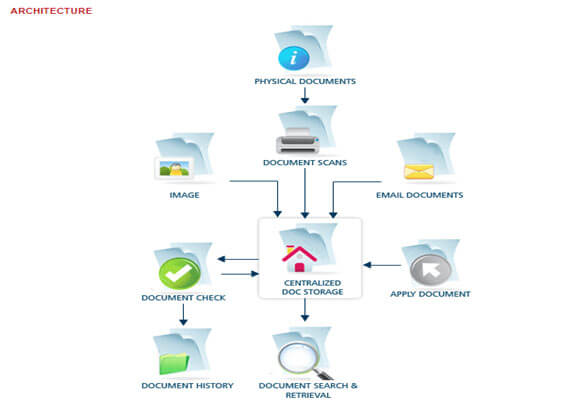
So how does it work? Most systems follow four simple steps, so the flow is easy to grasp.
- First, you capture a file by uploading it or scanning paper.
- Next, the system adds metadata, including the author, date, and type.
- Then it places the file in a secure repository with set permissions.
- Finally, it logs every change, so you always know who did what.
DMS vs. Cloud Storage
Many people ask if Google Drive or Dropbox is enough. Cloud storage is a place to keep files. A DMS, however, goes further. Plus, it manages the full life of a document, from creation to deletion.
For example, it can lock a file while one person edits it. It can also remove a record when its retention period ends.
Who Uses a DMS?
Almost every healthcare organization needs to store any type of document and use a DMS for version control. Furthermore, construction teams use it to manage drawings and approvals.
HR teams, on the other hand, utilize it to safeguard employee records. In fact, one HR department at a multi-site company spent more than 80 hours each month searching for paper files before it went digital.
Unique insight: Consider a DMS to be a memory system for your business, not a filing cabinet. A cabinet only holds paper, while a memory system also keeps the story behind each file. That story, such as who approved it and why, is often worth more than the file itself.
👉 If you want to improve how your business communicates and presents information, you can also learn more about How to Make Your Content Stand Out?.
2. Core Features of a Document Management System
Not every tool offers the same features, so compare them with care. However, a strong document management system should cover the basics below. So, use this list as your checklist.
Search and Metadata Tagging
Good search saves the most time, so it comes first. Look for full-text search and tags, so you can find a file by keyword, author, or date. Advanced tools also read scanned pages with OCR, which turns images into searchable text. Furthermore, filters help you narrow results by type or date.
Version Control
Document version control keeps one true copy of each file. It also stores past versions and shows who changed what. As a result, you can quickly revert any errors. Plus, you can say goodbye to files named “final_v7_REAL.”
Security and Access Control
In addition, a DMS lets you decide who can view, edit, or share each file. Experts call this role-based access control. For example, finance can see invoices, while sales cannot. Furthermore, an audit trail logs every action, which helps during audits.
Workflow Automation
Next, workflows send documents to the right person at the right time. For instance, a contract can move from draft to legal review to signature without a single email chase. The system tracks each approval, so nothing remains stuck.
Retention Rules and Backups
Finally, look for retention rules and backups. For example, retention rules delete or archive files on a set date. Meanwhile, backups protect you if something goes wrong. As a result, they keep your library clean and safe.
Collaboration and Integration
Furthermore, teams should be able to co-edit and comment. Prevent photocopying; connect with tools you already use, such as email, Microsoft 365, or accounting software. AWS also notes that a DMS needs deletion policies and clear permissions for building workflows.
Unique insight: Most buyers compare feature lists, but adoption features matter more. Ask if the tool works inside Outlook or Word, since people rarely change habits for a new app. So, a simple tool that staff actually use beats a powerful one they avoid.
3. Benefits: Why Your Business Needs a Document Management System
First, the case for a DMS starts with time. For example, a McKinsey study, cited by Crown Information Management, found that employees spend about 1.8 hours a day searching for information. That is nearly a quarter of the workday.
In addition, IDC research links document problems to up to 21.3% lost productivity. Meanwhile, Adobe found that 48% of employees often struggle to locate the files they need. Next, here are the main benefits:
Faster Work and Lower Costs
So, a fast search means fewer wasted hours. It also means fewer recreated files. One often-quoted estimate says it costs about $20 to file a document, $120 to find a misfiled one, and $220 to recreate a lost one. These figures are older and vary, yet the message is clear: lost files cost real money.
Better Security and Compliance
Because a DMS controls access and records every action, audits get easier. It also supports retention rules based on standards like ISO 15489. In short, that standard says records must stay authentic, reliable, usable, and intact.
Less Stress for Your Team
Effective tools also lift morale. Because staff grow tired of digging for files, morale drops. So, when search works, people feel calmer. As a result, they can focus on the work that matters.
Smoother Remote Teamwork
For instance, a cloud-based document management system lets staff open the latest version from anywhere. Consequently, hybrid teams stop emailing attachments back and forth.
A Growing Market
Finally, demand is rising fast. Mordor Intelligence values the market at USD 11.81 billion in 2026. It also expects USD 21.39 billion by 2031, a 12.61% yearly growth rate. Estimates differ between publishers, but they all point upward.
Unique insight: The biggest benefit is often decision speed, not storage savings. When a manager finds the right contract in 30 seconds, a deal moves the same day. So, track that gain.
Next, measure the time it takes for five people to locate five key files both before and after the launch. In short, this simple “find-it test” provides you with proof that any boss will understand.
4. How to Choose the Right Document Management System
Picking a tool can feel overwhelming, because so many options exist. So, use these steps to stay calm and focused.
Step 1: List Your Pain Points
First, start with problems, not products. Do staff lose files and stall approvals? Do audits cause stress? Next, write down your top three issues. Then rank them.
Step 2: Set Your Must-Have Features
Next, match features to your pain points. For example, if audits worry you, focus on audit trails and retention rules. If teams work remotely, choose a strong cloud tool with mobile access.
Step 3: Compare Deployment Options
You can pick cloud, on-premises, or hybrid, but each has trade-offs. Cloud, for example, is easier to start and needs less IT help. On-premises gives you more control, but it costs more to run. Hybrid mixes both.
Small teams often choose the cloud since document management software for small businesses is now quick to set up.
Step 4: Check Security and Compliance
First, ask about encryption, role-based access, and audit logs. Also ask where your data lives. If you work in health, finance, or law, confirm the tool meets your industry rules.
Step 5: Check Vendor Support
Even the best tool needs help sometimes, yet many buyers forget this fact. So, ask about training, response times, and updates. Also read reviews from firms your size. Then you will know what to expect after you sign.
Step 6: Test Before You Buy
Next, run a free trial with real files. Furthermore, ask three or four staff to try common tasks, such as uploading, searching, and sharing. Then collect their feedback. Also compare the total cost, including training, storage, and support, not just the monthly fee.
Unique insight: Write your retention schedule before you shop. In other words, this is a simple list of how long you must keep each document type. However, most buyers skip it.
Then they find out late that their favorite tool cannot delete files on a timer. Doing this step first turns a vague wish list into clear requirements.
5. How to Implement a DMS and Keep It Working
However, buying software is only half the job. The other half is actually getting people to use it. Follow these steps.
Start Small With a Pilot
First, pick one team, such as HR or finance. Move their files first. Then, please address any issues before scaling up. Success in one team also builds trust across the company. In addition, track simple results, such as search time and error counts. Later, you can share those numbers with leaders.
Clean Up Before You Move
Do not carry your mess into the new system, because it will slow you down. Delete duplicates. Archive old files. Then decide what to migrate. As a result, fewer files mean faster search and lower cost.
Build Simple Naming Rules
Next, agree on one naming format, such as Date_Client_DocumentType. Also limit folder depth to three levels. Thus, simple rules beat long manuals.
Train People and Explain the Why
Hold short, hands-on sessions, because people learn by doing. Then show staff how the DMS saves them time. Also name a “champion” in each team who can answer quick questions. Furthermore, share a one-page cheat sheet.
Assign Clear Owners
Because every system needs an owner, pick one person to manage permissions and rules. Otherwise, small problems pile up. Please also designate a backup owner to ensure that work continues smoothly.
Audit Every Quarter
In fact, a DMS is not a one-time project. Next, review permissions, remove stale files, and evaluate search results each quarter. Also update your document retention policy when laws change.
Get Ready for AI
Many vendors now add AI to sort files and pull out key data. However, these tools need tidy inputs. So, if you want these tools to work better tomorrow, please ensure you have clean metadata today.
Unique insight: Instead, treat adoption like a product launch, not an IT install. For example, set a launch date, send reminders, and celebrate the day the old shared drive turns read-only. As a result, that “read-only day” draws a firm line and stops the slide back into old habits.
Conclusion
A document management system is more than digital storage. In short, it is a smart way to capture, protect, and find the information your business runs on. As this listicle showed, the right system saves time, cuts risk, and helps teams work together from anywhere.
- First, remember what a DMS does. It stores files, tracks versions, controls access, and also automates workflows.
- Next, weigh the benefits. Research points to hours lost every week on document searches, so the payoff can be large.
- Then choose with care. Start with your pain points, write your retention schedule, and then test tools with real files.
- Finally, launch well. Run a pilot, clean up your data, train your team, and then audit every quarter.
Above all, keep it simple. In fact, the best tool is the one your people use every day. Still, a modest system with strong habits will beat a fancy one that gathers dust.
First, please identify your top three document problems. Then run the “find-it test” with five colleagues. The results will indicate the starting point. Thereafter, book two or three demos and compare them against your must-have list.
Frequently Asked Questions
1. What is a document management system, and how does it work for teams?
A document management system is software that captures, stores, and tracks files in one secure place. First, teams upload documents, add tags, set permissions, and locate files quickly with search. It also logs every change for quick reviews.
2. How is a document management system different from cloud storage?
Cloud storage, however, only holds files. A DMS also controls versions, sets access by role, automates approvals, and applies retention rules. In other words, it manages the whole document lifecycle, which helps with audits and compliance.
3. What features should small businesses look for in DMS software?
First, small businesses should look for strong search, version control, role-based access, and simple workflows. Also check for seamless integration with email and Microsoft 365. Finally, pick a cloud tool with clear pricing and quick setup.
4. How much does a cloud-based document management system usually cost?
In short, prices vary by vendor, user count, and features. Many vendors charge per user each month. However, you should also count training, storage, and support. Ask for a full quote and test a free trial first.
5. How long does it typically take to implement a new document management system?
A small pilot can go live in a few weeks. Then, a full rollout often takes a few months, depending on file volume and team size. Cleaning old files first and providing staff training will help expedite the process.

Tabassum Shaik is an Author, Researcher, and SEO Specialist with over 8 years of experience creating informative content on business, startups, entrepreneurship, marketing, technology, and digital trends. She specializes in researching industry trends and transforming complex topics into practical, easy-to-understand insights. Her goal is to help readers stay informed, learn new ideas, and make better business decisions.