

Introduction
Imagine your website just went through a major update. New code deployed, cache cleared, and the very next visitor hits your homepage. Their browser sits there, spinning. The server scrambles to rebuild every page from scratch. That painful, slow first-load experience? It has a name: the cold cache problem. And a warmup cache request is precisely the tool designed to eliminate it.
A warmup cache request is a proactive technique that pre-loads your website’s most critical pages and resources into the server cache before real users ever arrive. Rather than waiting for visitor traffic to organically rebuild the cache, you send controlled, automated HTTP requests in advance, filling the cache so that every user, from the very first, enjoys a fast, seamless experience.
In 2026, Google’s Core Web Vitals will be tighter than ever. Users are abandoning pages that take more than three seconds to load. Cache warming is no longer optional for serious websites. This complete guide walks you through exactly what warm-up cache requests are. Why they matter, how to implement them step by step, and the best practices that separate fast sites from slow ones.
What Is a Warmup Cache Request?
A warmup cache request is a controlled, synthetic HTTP GET request sent to your cacheable URLs before real user traffic arrives. Its sole purpose is to pre-populate the caching layers of your infrastructure, CDNs, reverse proxies, and in-memory stores. So that when actual visitors land on your site, content is retrieved from a fast cache rather than rebuilt from scratch on the origin server.
To understand warmup cache requests, you first need to grasp the difference between a cold cache and a warm cache.
- A cold cache is essentially an empty cache. Every request must travel all the way to your origin server, trigger database queries, compile HTML, and return the full response. This is slow and resource-intensive.
- A warm cache, by contrast, already holds the pre-built response in fast memory or on edge nodes. Serving from a warm cache happens in milliseconds rather than hundreds of milliseconds.
“Think of cache warming like stocking a fridge before guests arrive. No one wants to wait while you run to the grocery store.”
The three core caching layers that benefit most from warmup cache requests are:
The CDN edge cache (such as Cloudflare or Akamai, serving content from geographically distributed nodes), the reverse proxy cache (tools like Varnish or NGINX caching full HTML responses between your users and origin), and in-memory cache stores like Redis or Memcached, which hold database query results and computed data in RAM for near-instant retrieval.
- 90%+ target cache hit ratio.
- 80–90% Reduction in origin load.
- < 200 ms TTFB from warm cache.
- 3× Faster first-user response.
What makes warm-up requests unique and uniquely powerful is their intentionality. Unlike organic cache building (where cache fills only as users happen to visit pages), warming is a deliberate, systematic process you control. You decide which URLs to warm, in what order, and at what point in your deployment pipeline.
This transforms cache management from a reactive guessing game into a predictable, repeatable performance strategy.
Why Warmup Cache Request Matters for Performance and SEO?
Website performance is no longer purely a technical concern. It is a direct business metric. Research consistently shows that a one-second delay in page load time can lead to significant drops in conversions, engagement, and revenue. For e-commerce sites, media platforms, and SaaS applications, a cold cache after every deployment means every release risks a temporary but real performance regression.
Eliminating Cold Start Latency
The most immediate impact of a warm cache request is eliminating cold start latency. The elevated Time to First Byte (TTFB) occurs when a server must process a request from scratch. Without warming, the first visitor after a deployment or cache purge experiences the full processing cost: database queries, template rendering, and response assembly.
With warming, those costs have already been paid before the visitor arrives. The cache is pre-stocked; the user never waits.
Protecting Backend Infrastructure During Traffic Spikes
High-traffic events, product launches, flash sales, and major news coverage create sudden surges in demand. If a cache purge coincides with a traffic spike, your origin server can be overwhelmed trying to rebuild thousands of pages simultaneously for real users.
Cache warming acts as a buffer: by pre-populating the cache before the spike arrives, you dramatically reduce origin server load and prevent cascading failures. Industry benchmarks suggest that a well-implemented warming strategy can reduce origin traffic by 80–90% during peak windows.
SEO Benefits: Speed Signals and Googlebot Performance
Google uses page speed as a confirmed ranking signal, with Core Web Vitals, particularly Largest Contentful Paint (LCP) and TTFB, directly influencing search rankings. A warmup cache request ensures that when Googlebot crawls your site post-deployment, it encounters fast-loading pages rather than slow cold-cache responses.
Consistently fast pages lead to better crawl efficiency, more pages indexed per crawl budget, and ultimately stronger SEO performance. This is a rarely discussed but significant advantage of cache warming: it is not just a user experience tool. It is an indexing and ranking tool as well.
How to Implement a Warmup Cache Request: Step-by-Step
Implementing a warmup cache request strategy does not require enterprise infrastructure or a dedicated DevOps team. Even small websites can benefit from a straightforward warming script integrated into their deployment process. Here is a practical, step-by-step approach:
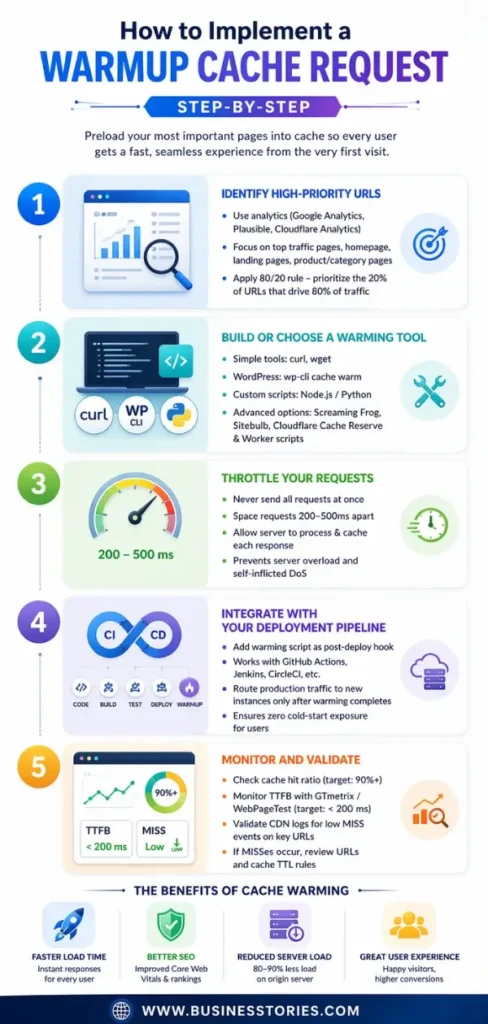
#1. Identify High-Priority URLs
Use your analytics tool (Google Analytics, Plausible, or Cloudflare Analytics) to identify your top pages by traffic volume. Focus on the homepage, top landing pages, product or category pages, and key conversion paths. Not every page requires warming. Prioritize the 20% of URLs that receive 80% of your traffic.
#2. Build or Choose a Warming Tool
Options range from simple curl scripts and wget commands to dedicated tools like wp-cli cache warm for WordPress or custom Node.js/Python scripts. For larger sites, tools like Screaming Frog, Sitebulb, or dedicated cache-warming services can systematically crawl your sitemap. Cloudflare users can leverage Cache Reserve and Worker scripts.
#3. Throttle Your Requests
Never fire warming requests all at once. Sending hundreds of simultaneous requests can overwhelm your own origin server effectively, creating a self-inflicted denial of service. Space requests 200–500ms apart to allow the server to process and cache each response before the next arrives.
#4. Integrate with Your Deployment Pipeline
The most powerful configuration is a warming script that fires automatically as a post-deploy hook in your CI/CD pipeline (GitHub Actions, Jenkins, and CircleCI). Route production traffic to new instances only after the warming process completes. This ensures zero cold-start exposure for users.
#5. Monitor and Validate
After warming, verify success by monitoring your cache hit ratio (target: above 90%) and TTFB via synthetic monitoring tools like GTmetrix or WebPageTest across multiple regions. Check CDN logs for a sharp drop in cache MISS events on high-traffic URLs. If you still see MISSes on priority pages, your warming script may be hitting incorrect URLs or not aligning with your cache TTL rules.
Example · Node.js Warmup Script
// Simple warmup script — fires after deploymentconst axios = require(‘axios’);
const urls = [
‘https://yoursite.com/’,
‘https://yoursite.com/products’,
‘https://yoursite.com/about’,
];
const delay = (ms) => new Promise(r => setTimeout(r, ms));
async function warmCache() {
for (const url of urls) {
await axios.get(url, { headers: { ‘User-Agent’: ‘WarmupBot/1.0’ }});
console.log(`Warmed: ${url}`);
await delay(300); // throttle: 300ms between requests
}
}
warmCache();
Types of Cache Warming Strategies

Not all cache warming implementations are identical. The right strategy depends on the size of your site, your infrastructure, and how frequently your content changes. Here are the four primary approaches used by high-performing web teams today:
Sitemap-Based Warming
The simplest and most popular approach. Your warming tool reads sitemap.xml and sends GET requests to every URL listed. This works well for content-heavy sites where the sitemap already reflects all important pages. The key advantage is that it focuses effort on pages you have explicitly declared as important. The limitation is that dynamic pages not in the sitemap (like filtered product listings) may be missed.
Scheduled / Time-Based Warming
For websites where content changes frequently, news publishers, e-commerce stores with live inventory, or platforms with hourly price updates. A one-time post-deployment warming is insufficient. Scheduled cache warming runs at regular intervals (hourly, daily) using a cron job or task scheduler to keep high-traffic pages continuously fresh. This prevents gradual cache degradation as TTLs expire throughout the day.
Event-Triggered Warming
The most surgical approach: warming fires only when specific events occur. A post is published, a product is updated, or a cache purge is triggered. This avoids unnecessary server load while ensuring cache freshness for content that has actually changed. WordPress plugins like WP Rocket and W3 Total Cache support this pattern natively, firing warmup requests whenever post content is updated.
Geo-Distributed Warming
For sites with a global audience, warming a single origin cache is not enough. CDN edge nodes in different geographic regions start empty after a purge. A distributed warming strategy sends requests from multiple geographic locations either through multi-region CI/CD runners or CDN-native warm-up APIs. Ensuring consistent performance for users in every region, not just those near your origin server.
Cache Warming Checklist Best Practices:
- Prioritize the homepage, top landing pages, and conversion paths first.
- Throttle requests to 200–500ms apart to avoid self-inflicted overload.
- Align warming with your cache TTL. Warm just before expiry or after invalidation.
- Exclude personalized, admin, checkout, and session-dependent pages.
- Simulate a mobile user agent to align with Google’s mobile-first indexing.
- Integrate warming as a mandatory post-deploy CI/CD step, not an afterthought.
- Monitor cache hit ratio; aim for 90%+ within minutes of completing warmup.
Common Mistakes When Implementing Warmup Cache Request
Even a well-intentioned cache-warming strategy can backfire if implemented carelessly. Understanding the most common pitfalls will save you hours of debugging and prevent potential outages.
Warming the Wrong Pages
Many teams warm their entire URL list indiscriminately, including admin dashboards, user account pages, checkout flows, and other personalized or authenticated content. These pages either cannot be cached (they contain user-specific data) or should not be cached (sensitive financial information).
Warming them wastes server resources and, worse, can cause security issues by inadvertently caching private data. Always define a strict allowlist of cacheable, public-facing URLs before writing your warming script.
Overwhelming the Origin Server
Firing hundreds of concurrent warming requests without rate limiting is functionally equivalent to a DDoS attack on infrastructure. Always implement throttling. 200 to 500 milliseconds between requests is a safe starting point.
For very large websites with thousands of pages, consider warming in batches during off-peak hours or using a dedicated warming CDN feature rather than hitting your origin directly.
Ignoring Cache TTL Alignment
If you warm your cache immediately after a deployment, but your CDN has a short TTL of 5 minutes, your warming effort will expire before peak traffic arrives. Always align your warming strategy with your cache TTL rules. Either extend TTLs for critical pages during high-traffic periods or schedule rewarming to fire before TTLs expire on your most important URLs.
Not Monitoring Effectiveness
Warming without measurement is just guessing. Many teams assume their warming strategy is working simply because they have a script. In practice, warming can silently fail due to URL mismatches, authentication issues, or CDN configuration errors.
Set up automated monitoring of your cache hit ratio and TTFB after every deployment. A sudden drop in origin traffic and a spike in cache hits are the clearest confirmation that your warm-up cache request strategy is doing its job.
Conclusion: Make Warmup Cache Request Your Default Performance Practice
A warm cache request is one of those rare performance optimizations that delivers benefits across every dimension simultaneously: faster user experiences, lower server load, improved SEO rankings, and greater infrastructure resilience during traffic spikes.
Yet it remains surprisingly underutilized, particularly among small and mid-sized websites that assume it is only relevant for enterprise-scale operations. The truth is exactly the opposite: even a simple WordPress blog benefits enormously from warming its cache after every plugin update or content publish.
The core principle is straightforward. Your cache starts cold after every deployment, purge, or server restart. The first visitor would normally pay the full cost of rebuilding that content from scratch. A warmup strategy transfers that cost away from real users by sending controlled requests through your deployment pipeline. Ensuring that by the time the first genuine visitor arrives, the cache is already hot and ready to serve instantly.
Whether you implement a simple sitemap-based warming script, a scheduled cron job, or a fully automated post-deploy hook integrated with your CI/CD pipeline, the investment is minimal compared to the consistent performance gains. Start with your 10 most-trafficked pages, measure your cache hit ratio and TTFB, and expand from there. Make cache warming part of your standard deployment checklist, and your users will notice the difference from the very first click.
Start with your top 10 URLs and a simple throttled script. Measure cache hit ratio before and after deployment. Build from there. Your users (and Googlebot) will thank you.
Frequently Asked Questions
1. What is the difference between a warmup cache request and cache prefetching?
A warm-up cache request is system-driven and proactive. You deliberately pre-populate cache layers before traffic arrives, typically around deployments, purges, or known traffic spikes. Cache prefetching is more user-driven and behavioral: it anticipates what a specific user is likely to request next (for example, pre-loading product review pages when a user lands on a product page).
2. How long does a warmup cache request process take for a large website?
Cache warming time varies based on URL count, content complexity, cache layers, and CDN locations. While small sites finish in minutes, large platforms may take hours; however, using automated, geo-distributed strategies and prioritizing high-traffic pages significantly reduces overall warming time.
3. Can a warmup cache request negatively impact my server performance?
Yes, without throttling, cache warming can overwhelm servers like a denial-of-service attack. However, spacing requests 200–500 ms apart, running during off-peak hours, and skipping uncacheable pages prevents issues. When done right, it reduces server load by 80–90% during peak traffic.
4. Do POST requests work for warming catches?
No, POST requests aren’t cacheable by default since they modify server state. CDNs and caches typically store only GET responses. For cache warming, focus on cacheable GET requests, public pages, and static assets, as warming POST endpoints only increases backend load without any caching benefit.
5. How do I know my warmup cache request strategy is actually working?
Key performance indicators include cache hit ratio and Time to First Byte (TTFB). An effective warming strategy boosts the cache hit ratio above 90% quickly. Meanwhile, TTFB for priority pages should fall below 200ms. Additionally, CDN logs should show fewer MISS events. Tools like GTmetrix, WebPageTest, and CDN analytics help monitor performance.

Senior SAP Consultant with 10+ years of experience delivering end-to-end enterprise solutions in the IT industry.