
Introduction
Finding the right image on the internet may seem straightforward. However, it can quickly turn into a maze of irrelevant results, stock photos, and dead ends. Therefore, whether you’re a marketer trying to track your visuals, a researcher fact-checking a photo, or simply someone identifying an object, knowing the right image search techniques can save you hours of frustration.
In 2026, image search has evolved far beyond typing keywords into Google Images. Today, tools powered by AI and computer vision can identify objects, recognize faces, match visual patterns, and even translate text inside photos. Furthermore, with platforms reporting billions of visual searches every month, the ability to reverse image search and search by image effectively is no longer a niche skill. It’s a core digital literacy skill.
This guide walks you through everything you need to know. From basic keyword-based searches to advanced reverse image search strategies, you’ll come away with practical, actionable techniques you can use right away. Let’s dive in.
Understanding Image Search Techniques and How They Work
Image search techniques are the methods and strategies you use to find, verify, or discover information through visual content rather than text alone. Instead of relying solely on words, these techniques harness AI, pattern recognition, and contextual signals to locate images or information about images across the web.
Search engines like Google and Bing use advanced algorithms powered by AI and machine learning. For instance, if you upload a photo using Search by Image, the system identifies patterns and compares them with millions of indexed images.
For professional SEOs, journalists, photographers, and marketers, image search techniques are essential tools for link building, fact-checking, brand protection, and content research. Moreover, the way search engines understand images has fundamentally changed. Modern AI models analyze not just the pixels in an image, but also the surrounding text, page context, site authority, and structured data around it.
How Do Search Engines Interpret Images?
Search engines analyze:
- File names and alt text.
- Image context (surrounding text).
- Metadata (EXIF data).
- Visual patterns (colors, shapes, objects).
Why Do Basic Searches Often Fail?
Most users type generic queries like “beautiful landscape.” As a result:
- The results are too broad.
- Irrelevant images appear.
- Time is wasted refining searches.
What Are the Different Types of Image Search Techniques
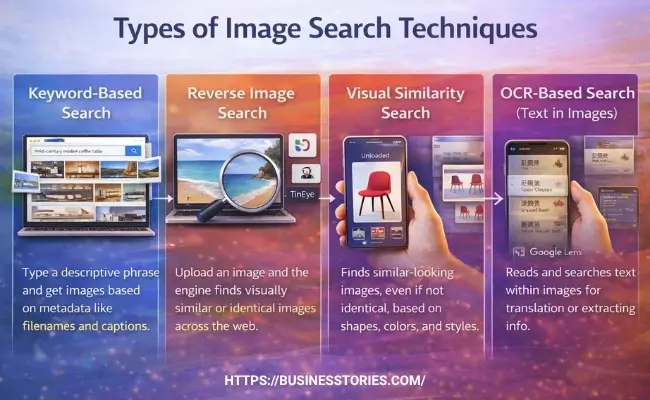
Not all image searches work the same way. In fact, there are several distinct approaches, each suited to a different goal or situation. Understanding which technique to use and when is the foundation of effective visual searching.
Keyword-Based Image Search
This is the classic method: you type a descriptive phrase into a search engine, and it returns images that match. The engine doesn’t actually “look” at images; instead, it reads the surrounding metadata, the filename, alt text, captions, and nearby paragraphs.
For instance, searching “mid-century modern coffee table” on Google Images pulls results based on how creators have described and tagged those images.
This approach works best for broad inspiration, stock photo discovery, and general topic research. To get more refined results, use specific, descriptive terms and take advantage of filters like image size, color, and usage rights.
Reverse Image Search
Reverse image search flips the process entirely. Instead of typing words, you upload an image, and the search engine finds visually similar or identical images across the web. This is the technique most commonly associated with reverse image search tools like Google Lens and TinEye.
Professionals use this technique daily to track where their images appear online, verify the authenticity of news photos, find the source of a viral picture, and even discover unauthorized use of their content for backlink opportunities.
As a unique insight, many SEO experts use reverse image search not just defensively but offensively. Uploading their best graphics to find websites that have used them without attribution, then requesting a proper backlink. It’s one of the most underused white-hat link-building strategies available.
Visual Similarity Search
This technique finds images that look similar, even if they’re not identical. For example, uploading a photo of a chair might surface chairs with similar shapes, colors, and styles from across the web.
Google Lens and Bing Visual Search both excel at this. It’s especially powerful in e-commerce, where shoppers want to find products matching a specific aesthetic.
OCR-Based Search (Text in Images)
Optical Character Recognition (OCR) allows tools to read and search text embedded within images. Google Lens, for example, can scan a menu in a foreign language and translate it in real time. This technique is invaluable for researchers, travelers, and anyone working with documents, screenshots, or signs in different languages.
How to Use Reverse Image Search Effectively?
Reverse image search is arguably the most powerful image search technique in your toolkit. Here’s a step-by-step breakdown of how to use it across different platforms and devices.
Using Google Lens on Desktop
Google has largely transitioned from its old “Search by Image” camera icon to Google Lens as the primary visual search tool. To use it on a desktop.
- Visit images.google.com.
- Click the lens icon (camera symbol) in the search bar.
- You can then upload an image from your computer, paste an image URL, or drag and drop a photo directly into the search field.
Chrome users can also right-click any image on a webpage and select “Search with Google Lens” for instant results in a side panel.
Using Google Lens on Mobile
- On Android and iPhone.
- Open the Google app or Chrome app.
- Tap the Lens icon in the search bar.
- From there, choose a photo from your gallery or take a new one.
- Alternatively, long-press any image on a webpage and tap “Search image with Google Lens.”
This method is perfect for on-the-go searches, identifying products in stores, recognizing plants, or reading foreign-language signs in real time.
You can use TinEye for copyright and provenance research.
TinEye takes a different approach from Google. Rather than visual similarity, it focuses on exact matching using image fingerprinting. This makes it the go-to tool for tracking the earliest known use of an image, finding higher-resolution versions, or verifying whether a photo has been manipulated. If you need to prove image provenance, TinEye is your best starting point.
Using Bing Visual Search for Product Discovery
Bing Visual Search offers a particularly powerful feature: you can draw a crop around a specific part of an image, a logo, a texture, or a piece of furniture, and search just for that element. This is exceptionally useful for e-commerce research, supplier discovery, and competitive product mapping. It frequently surfaces different results than Google, making it a valuable second opinion.
Pro Tip: Use Multiple Tools Together
No individual reverse image search tool has complete coverage of the web.
- Professional researchers and SEOs typically run searches across Google Lens, TinEye, and Bing Visual Search simultaneously.
- For face or landmark searches, Yandex Images often significantly outperforms Western tools, providing more accurate results and a broader database for these types of queries.
- Some meta-search tools like ReverseImageSearch.com query multiple platforms at once, saving considerable time.
Advanced Image Search Techniques for SEO and Marketing
Beyond finding images, professionals use image search techniques to gain competitive intelligence, build backlinks, and protect their brand. Consequently, these strategies can significantly amplify your digital marketing results.
#1. Finding Unlinked Brand Mentions via Images
Upload your logos, infographics, and branded visuals to reverse image search. Any site using your images without a proper attribution link is a potential backlink opportunity. Send a polite outreach email that points out the use and requests a credit link.
According to SEO experts, it is one of the highest-quality white-hat link acquisition strategies because the site has already demonstrated interest in your content.
#2. Competitor Research and Content Gaps
Search for your competitors’ most-shared visual content using image search techniques. Platforms like Pinterest, often overlooked as an SEO tool, reveal how top creators in your niche are organizing their content, which topics drive engagement, and which domains consistently appear as visual content sources.
This intelligence helps you identify content gaps and create visuals that outperform the competition.
#3. Verifying Images Before Publishing
In an era of deepfakes and AI-generated content, publishing unverified images can seriously damage your credibility. Journalists, researchers, and content creators use reverse image search to check whether a photo has been manipulated, reused out of context, or fabricated entirely.
Running an image through both TinEye and Google Lens before publishing takes just a few seconds, but can protect your editorial reputation enormously.
#4. Tracking Competitor Visual Campaigns
Regularly run competitor product images and branded visuals through visual search tools to see where they appear online. This reveals PR placements, affiliate networks, and content partnerships you weren’t aware of, all of which can inform outreach strategy.
How to Optimize Images for Better Search Visibility
Knowing how to search by image is only half the equation. If you publish images online, you also want them to be easy to find. Here’s how to optimize your visuals for search engines.
Use Descriptive, Keyword-Rich Filenames
- Before uploading any image, rename the file using descriptive, hyphen-separated words that reflect the content.
- A file named “IMG_businesstories.jpg” tells search engines absolutely nothing.
- Renaming it to “reverse-image-search-techniques-guide.jpg” immediately signals relevance to both search algorithms and AI crawlers.
Write Meaningful Alt Text
Alt text is the single most important on-page signal for image search. Write a natural, descriptive sentence that explains what the image shows, incorporating relevant keywords without stuffing.
For example, “Diagram illustrating how reverse image search techniques work using Google Lens” is far more effective than “image1” or a keyword list.
Compress Images Without Sacrificing Quality
Page speed is a confirmed Google ranking factor, and images are often the biggest contributor to slow load times. Convert images to WebP format, which offers superior compression without visible quality loss.
Additionally, use responsive image techniques with the HTML srcset attribute to serve appropriately sized images to mobile and desktop users separately. With over 60% of Google searches now happening on mobile, this step directly impacts your Core Web Vitals scores.
Place Images Near Relevant Text
Where an image sits on a page matters for SEO; Google gives more weight to images placed near related text content and higher up on the page. If your article discusses image search techniques, embed a relevant infographic directly within that section, not buried in a sidebar or footer. This contextual placement helps search engines connect the visual to the topic.
Add Structured Data (ImageObject Schema)
Adding JSON-LD structured data with the ImageObject schema helps AI-powered search systems understand your images precisely. This markup signals your image’s subject, license, creator, and relationship to surrounding content, all of which improve your visibility in Google Images, AI Overviews, and Google Lens results.
Best Tools for Image Search in 2026
Choosing the right tool depends entirely on your goal. Here is a quick breakdown of the best options available today.
1. Google Lens
It remains the most widely used visual search tool. It’s built into Google Search, Chrome, and the Google app, and it excels at object identification, product discovery, and real-time translation. It’s the first stop for most searches.
2. TinEye
Specializes in exact image matching and provenance tracking. It’s the best tool for finding the source of an image, detecting unauthorized use, and verifying copyright.
3. Bing Visual Search
It offers strong product identification and a unique cropping feature that lets you isolate and search specific elements within an image. It often returns different results from Google, making it an excellent complementary tool.
4. Yandex Images
It is particularly powerful for facial recognition and landmark identification, often outperforming Western tools in these use cases.
5. Lenso.ai
It is a newer AI-powered reverse image search engine that supports multiple search modes—people, places, duplicates, and similar images—making it a versatile option for detailed research.
6. Pinterest Visual Search
It is ideal for style and design inspiration. Within any pin, the built-in visual search tool identifies objects and surfaces with similar content across Pinterest’s vast image library.
Conclusion
Mastering image search techniques is no longer optional in today’s visually driven digital world. From quickly identifying an unknown object with Google Lens to tracking your branded content with TinEye, the right tools and strategies can dramatically improve your results, whether you’re searching for information or trying to make your own images discoverable.
The key takeaway is this: use multiple tools, understand what each one does best, and always think about both sides of the equation:
- How to find images effectively?
- How to optimize visuals so others can find them?
Reverse image search techniques, in particular, are vastly underused, especially for SEO link-building and brand protection.
As AI continues to reshape visual discovery, the searchers and publishers who invest time in learning these techniques today will have a clear advantage tomorrow. Multimodal queries, combining images, text, and voice, are already becoming mainstream, and platforms that optimize for them now will dominate search visibility in the years ahead.
Ready to put these techniques to work? Start today by running your top five website images through Google Lens and TinEye. You might be surprised to discover where your visuals are already appearing and what link-building opportunities are waiting to be claimed. Share this guide with a colleague who could benefit, and bookmark it for future reference as image search tools continue to evolve.
Frequently Asked Questions (FAQs)
Q1. What are the best image search techniques for finding the source of a photo?
The best approach is to combine TinEye, which specializes in exact image matching and provenance, with Google Lens. Sort TinEye results by “oldest” to pinpoint the earliest known appearance. Then cross-reference with Bing Visual Search to confirm the source with greater accuracy.
Q2. How does reverse image search help with SEO link building?
Upload your branded images to Google Lens or TinEye to find websites already using your visuals without attribution. Politely reach out and request a backlink. This white-hat strategy generates high-quality, contextually relevant links because those sites have already shown genuine interest in your content.
Q3. Can I do a search by image on my iPhone or Android phone?
Yes. On both Android and iPhone, open the Google app or Chrome and tap the Lens icon. Select a photo from your gallery or take a new one. You can also long-press any image in Chrome and choose “Search image with Google Lens” for instant results without saving the photo first.
Q4. How accurate is reverse image search for verifying fake or AI-generated images?
Reverse image search is effective for detecting reused or manipulated photos. But it has limitations with freshly generated AI images not yet indexed. For best results, combine Google Lens with TinEye and cross-reference metadata. Always pair image verification with additional fact-checking methods for critical editorial decisions.
Q5. What image format is best for SEO and fast loading?
WebP is currently the recommended format for web images. It offers smaller file sizes with no visible quality loss compared to JPEG or PNG. For cutting-edge performance in 2026, the AVIF format provides even better compression. Both formats are supported by Google and help improve Core Web Vitals, which directly influence search rankings.

I am Tabassum, a writer and storyteller passionate about sharing inspiring startup stories and real entrepreneurial journeys. I believe in keeping things simple and practical, offering actionable insights on business, marketing, and growth. Through my content, I aim to inspire aspiring entrepreneurs to believe in themselves and take bold steps toward success.