
Running a business is tough. You deal with emails, calls, and invoices every single day. There is little time left to grow. This is where business automation tools help. They take care of repeat tasks for you. So you can focus on what drives real growth.
The data is clear. McKinsey found that 67% of small firms using automation grew revenue by 20% or more. Furthermore, businesses earn 3.70 dollars back for every dollar they put in. Therefore, automation quickly yields returns. In this guide, we cover the ten best business automation tools for 2026. We also explain which tool suits whom and how to get started.
What Are Business Automation Tools?
Business automation tools are software apps that run tasks on their own. They send emails, update records, route tickets, and connect your apps. Moreover, they do all of these tasks without errors or delays. Think of them as a staff member who works 24 hours a day and never makes a mistake.
The market for these tools is growing fast. The global market for business process automation reached 15.81 billion dollars in 2025. Furthermore, it is set to double by 2030. So this phenomenon is not a passing trend. It is the new way to run a business.
Furthermore, you do not need coding skills to use most tools. Many have simple drag-and-drop builders. So your team can set up workflows in minutes.
Why You Need Business Automation Software in 2026
Your rivals are automating right now. In fact, about 60% of firms have added automation to at least one workflow. So if you still do things by hand, you are falling behind.
Furthermore, automation cuts costs. Finance teams save around 46,000 dollars per year by removing manual invoice steps. Furthermore, smart automation can cut costs by up to 70%. Those are real results, not promises.
In addition, automation reduces errors. Data is 99% accurate when you use business process automation software for reports. That means cleaner books, faster audits, and better choices. So let us look at the best tools to help you get there.
The 10 Best Business Automation Tools to Scale in 2026
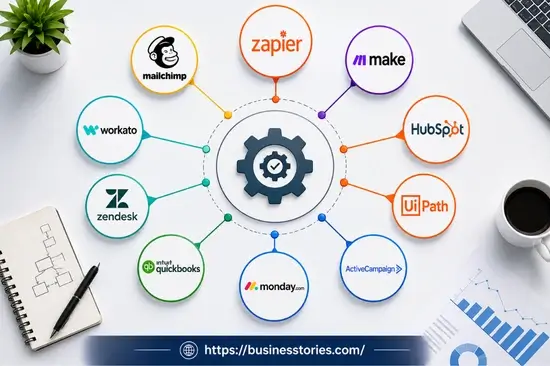
1. Zapier — Best for App Integration and No-Code Workflows
Zapier connects over 8,000 apps. It lets you build automated workflows without any coding. These are called Zaps. For example, a new lead from your web form can go to your CRM, your email list, and Slack all at once.
Furthermore, Zapier’s AI Copilot lets you type a workflow in plain language. Then it builds the setup for you. So even non-tech users can run complex tasks in minutes.
Zapier is ideal for startups and growing teams. It also works for solo founders who wear many hats. In fact, it is one of the tools that gives you a return within weeks, not months.
Best for: Teams that use many cloud apps and want fast, no-code workflow automation.
Tip: Start with one Zap that saves you 30 minutes a day. Then add more as your needs grow.
2. Make (formerly Integromat) — Best for Advanced Visual Workflows
Make gives you more control than Zapier does. Its visual builder shows how data moves through each step. So you see exactly what happens at every stage of your workflow.
Moreover, Make handles complex logic well. You can add filters, rules, and error routes inside one workflow. In addition, it supports real-time data processing. So it is ideal for online stores that need instant order handling.
Make is also more cost-effective at scale than many rival tools. Therefore, teams who need detailed automation without high costs will love it.
Best for: Teams that need advanced workflow automation at a low cost per task.
Tip: Use Make’s free scenario templates to cut setup time and go live faster.
3. HubSpot — Best for CRM and Marketing Automation
HubSpot puts your CRM, email marketing, sales pipeline, and support tools in one place. Because of these features, your customer journey is simple to automate. You can trigger emails based on user actions. You can move deals forward on their own. And you can alert your sales team in real time.
For growing firms, this process saves a huge amount of time. You only need to build a flow once, rather than chasing every lead by hand. Then HubSpot handles all the follow-ups. Furthermore, its reports show you what drives results.
HubSpot’s free plan is excellent for early-stage businesses. As a result, you can start at no cost and upgrade as you grow.
Best for: Businesses that want one platform for CRM, email marketing, and sales workflows.
Tip: Use HubSpot’s deal pipeline automation to move leads through stages without manual effort.
4. UiPath — Best for Robotic Process Automation
UiPath leads the market for robotic process automation (RPA). It uses software bots to copy human actions inside apps. So it is ideal for tasks in older systems that have no modern APIs.
In 2026, UiPath can also read PDFs, scanned forms, and even handwritten text without custom setup. Therefore, finance and ops teams can automate document work that other tools cannot handle.
UiPath is best suited for mid- to large-sized businesses with IT teams. It takes longer to set up than simpler tools. However, the payoff is large for high-volume back-office tasks.
Best for: Large businesses with legacy systems that need to automate document work at scale.
Tip: Start with the UiPath community edition. It is free and excellent for testing before you buy.
5. ActiveCampaign — Best for Email Marketing Automation
ActiveCampaign goes far beyond basic email blasts. It lets you build smart sequences based on what your contacts do. So each person gets the right message at the right time.
For example, you can send a welcome email when someone signs up. Then follow up with tips over the next week. Then offer a deal when they visit your pricing page. That kind of smart flow converts far more leads.
In fact, email automation gives you an average return of 42 dollars per dollar spent. Furthermore, ActiveCampaign includes a built-in CRM. So your marketing and sales teams stay in sync.
Best for: Businesses that want deep email marketing automation without complex enterprise tools.
Tip: Set up an abandoned cart email flow first. It is one of the highest-ROI automations you can build.
6. Monday.com — Best for Project and Operations Automation
Monday.com is a work tool with strong built-in automation. You can automate task handoffs, deadline alerts, status updates, and approval steps. As a result, your team spends less time on admin and more time on real work.
Furthermore, its interface is easy for everyone to use. Even non-tech staff can create automations using a simple “when this happens, do that” setup. Furthermore, it links with Slack, Google Drive, Zoom, and HubSpot. So your automations can cover your entire stack of tools.
For teams running many projects at once, Monday.com cuts confusion fast. It keeps everyone on the same page without constant check-in calls.
Best for: Ops and project teams who need simple workflow automation across their tools.
Tip: Automate your weekly update emails from Monday.com and save an hour every Friday.
7. QuickBooks Online — Best for Accounting Automation
QuickBooks Online is the top pick for small business accounting automation. It pulls in bank data, sorts it into categories, sends invoices, and builds reports on its own. Therefore, you spend far less time on books and significantly more time on your business.
Manual books lead to costly errors. In contrast, QuickBooks cuts those errors. It improves data accuracy to 99% and reduces reconciliation time by 70%. Those are big wins for any business owner.
Moreover, QuickBooks links with Shopify, Stripe, PayPal, and hundreds more apps. So your sales data, costs, and invoices all flow to one place.
Best for: Small to mid-sized businesses that want to automate their books, invoices, and reports.
Tip: Connect QuickBooks to your payment tool first. That one step handles most of your daily bookkeeping.
8. Zendesk — Best for Customer Support Automation
Zendesk uses automation to handle support tickets and resolve common questions. In 2026, its AI can deflect a large share of routine queries on its own. So your support team deals only with complex, high-value issues.
Its Answer Bot gives instant replies using your knowledge base. Furthermore, smart triage sends tickets to the right agent based on topic and urgency. As a result, response times drop from hours to seconds.
Faster support translates into happier customers for SaaS companies and online retailers. And happier customers stay longer, which grows your revenue.
Best for: Businesses with high support volumes that want to automate common queries and cut wait times.
Tip: Build your knowledge base first. Then turn on the Answer Bot to start reducing tickets right away.
9. Workato — Best for Enterprise AI Automation
Workato is built for large, complex businesses. It connects hundreds of apps and runs advanced multi-step workflows across all departments. Therefore, it suits firms that have grown beyond simpler tools.
Its AI layer is what makes it stand out. It learns from your workflows and suggests ways to improve them over time. Furthermore, Workato supports human-in-the-loop steps. So the system handles routine tasks but flags issues for a real person to check. That balance works well for finance, legal, and healthcare teams.
Best for: Large enterprises that need AI-powered workflow automation across complex, multi-department processes.
Tip: Use Workato’s pre-built recipes for common tasks like employee onboarding or invoice approval.
10. Mailchimp — Best for Small Business Email Automation
Mailchimp is the most accessible email tool for small firms and solo founders. Its free plan is one of the best you will find. And it covers the core automation needs of most small businesses very well.
You can set up welcome emails, cart alerts, birthday offers, and re-engage flows. Furthermore, Mailchimp’s AI tools help you write subject lines and email copy faster. So even a one-person team can send great campaigns.
Furthermore, it links with Shopify, WooCommerce, and WordPress. As a result, your store data goes directly into your email automation.
Best for: Startups and solo founders who want simple, low-cost email automation with a solid free option.
Tip: Set up a three-email welcome series on day one. It builds trust and drives early sales fast.
How to Pick the Right Business Automation Tool
Start by naming your biggest pain point. Are you losing time on data entry? Try Zapier or Make. Do leads slip away? Use HubSpot or ActiveCampaign. Is your support team swamped? Look at Zendesk.
Furthermore, think about your team’s skills. If you have no coders, start with no-code tools like Zapier, Monday.com, or HubSpot. They give quick wins with no complex setup. On the other hand, if you have tech staff, tools like Make, UiPath, or Workato unlock far more power.
Furthermore, check what apps each tool connects to. Your tool must work with the software you already use. Most tools here link with hundreds of platforms. However, it is smart to confirm before you buy.
Finally, start small. Pick one task to automate first. Measure the time it saves. Then expand. That way, you build confidence fast and prove value before you scale.
Conclusion
Business automation tools are no longer just for big companies. In 2026, they cover every core business function. From email and support to finance and project management, the ten tools in this guide each solve a real problem. So there is a right fit for every business, big or small.
Moreover, getting started does not cost much. Many tools here have free plans. So you can test automation with no upfront risk. Start by picking the one task that drains the most time from your week. Then choose the tool that solves it best.
Furthermore, remember that automation is not about replacing people. Instead, it’s about freeing your team to do better work. Let the tools handle the routine tasks. As a result, your team can focus on strategy, growth, and the work that truly matters. Start your journey today. Your future self will thank you.
Frequently Asked Questions
Q1: What are the best business automation tools for small businesses?
Zapier, Mailchimp, HubSpot, and QuickBooks are top picks. They are low-cost, easy to set up, and cover key areas like marketing, sales, and accounting automation well.
Q2: How do business automation tools help you scale faster?
They handle repeat tasks on their own. So your team can serve more customers and grow revenue without adding more staff or raising costs in the same way.
Q3: Are business automation tools difficult to set up and use?
Most modern tools use no-code builders. Platforms like Zapier and Monday.com let you build flows in minutes, with no coding or tech skills needed at all.
Q4: Which tool is best for email marketing automation in 2026?
ActiveCampaign is the top pick for smart, behavioral email flows. Mailchimp is ideal for small businesses that want a simple and low-cost plan with a solid free option.
Q5: What is the ROI of using business process automation software?
Businesses average 3.70 dollars back for every dollar they invest. Furthermore, firms using AI-driven tools cut their running costs by 40 to 60 percent on average.

Seasoned Project Manager with 20+ years of experience in the IT industry, driving successful project delivery, team leadership, and strategic execution.