Short videos are taking over social media. Instagram Reels reach more people than any other format on the platform. But most creators still use basic tools and then wonder why their content does not grow. The right Instagram Reels editing apps can fix that fast.
They help you cut clips, add transitions, sync music, and generate captions with AI. Whether you are new to video editing or a pro creator, the right app saves hours every week.
In 2026, the options are better than ever. We researched and tested the top tools. We looked at ease of use, AI features, export quality, and pricing. Here are the 10 best Instagram Reels editing apps you can use today, free, paid, and AI-powered.
Why Good Instagram Reels Editing Apps Matter
Instagram’s built-in editor works fine for quick clips. But it limits you when you want creative control. You cannot add multi-layer text, smooth transitions, or beat-synced cuts inside the native app. That is why dedicated video editing apps for Instagram Reels are now must-have tools.
Also, the Instagram algorithm rewards high-quality videos. Forbes reports that time spent on Instagram grew by more than 40% after Reels launched. Creators who use pro editing tools make content that holds attention longer. Longer watch time means more reach. So the app you choose matters as much as your content idea.
What to Look for in an Instagram Reels Editing Apps
Before we dive into the list, here are the key features to check. First, look for 9:16 vertical video support. This is the standard format for Reels. Second, find apps with auto-caption tools. Captioned videos get more views. Third, check for AI features like beat sync, background removal, and smart trimming. These save a lot of time. Finally, compare pricing. Many excellent apps are free or very cheap.
10 Best Instagram Reels Editing Apps in 2026
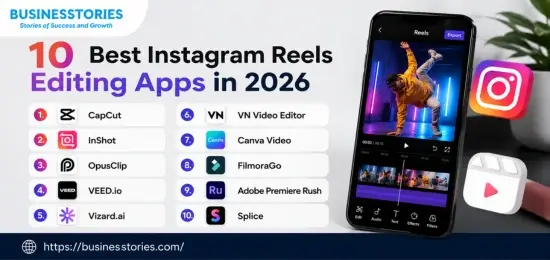
1. CapCut — Best Free App Overall
Best for: Beginners and creators who want powerful free tools.
Pricing: Free; Pro at ~$9.99/month
CapCut is the most popular Instagram Reels editing app in 2026. It is free for most features and exports without a watermark. ByteDance, the maker of TikTok, built it. So its template library stays updated with trending formats all the time.
The app gives you auto-captions, AI background removal, beat sync, and over 50 visual styles. You also get a step-by-step AI workflow that takes you from an idea to a finished reel. Plus, CapCut works on iOS, Android, Windows, Mac, and the browser. This makes it excellent for creators who switch between devices. If you want zero cost and strong output, start with CapCut.
2. InShot — Best for Quick Mobile Edits
Best for: Creators who edit only on their phone.
Pricing: Free with ads; Pro at $19.99/year
InShot is built for social media. It is fast, clean, and easy to learn. You can trim clips, sync music, add keyframes, and layer text with ease. The free version exports without a watermark, though ads are included.
At $19.99 per year, InShot Pro costs less than $2 per month. That unlocks all AI tools, stock music, and ad-free results. Furthermore, InShot’s vertical layout makes it one of the best apps for editing Instagram Reels on a phone. No need to resize your footage at all.
3. OpusClip — Best AI App for Repurposing Videos
Best for: Podcasters, YouTubers, and educators with existing long videos.
Pricing: Free plan (60 min/month); paid from ~$15/month
OpusClip is a real time-saver. You paste a YouTube, Zoom, or Google Drive video link. Then OpusClip’s AI watches the video, picks the best moments, and turns them into vertical Reels. Each clip gets a Virality Score from 0 to 100. This score shows how likely the clip is to perform well.
The app also adds captions, highlights key words, and detects the active speaker on screen. If you make one hour of long-form content per week, OpusClip can turn it into 10 or more Reels on its own. That is a giant edge most creators do not use. This unique insight sets OpusClip apart from simple clip editors.
4. VEED.io — Best Browser-Based Editing App
Best for: Marketers and teams who work on video together.
Pricing: Free with watermark and Lite at $18/month and Pro at $30/month.
VEED.io runs fully in the browser. No download is needed. This makes it ideal for teams that share projects across devices. VEED’s AI caption tool is one of the most accurate available. It supports over 50 languages and creates subtitles in seconds.
Also, VEED offers smart reframing, AI voiceovers, and background removal. The Pro plan includes 4K exports, which is ideal for brands that need crisp, clean Reels. If you manage video for clients or work in a team, VEED removes the friction of file sharing and version control.
5. Vizard.ai — Best for Batch Clip Creation
Best for: Content teams with large video libraries.
Pricing: Free (60 min/month); paid from $14.50/month
Vizard.ai is fast and built for volume. You upload long videos, and the AI finds the best shareable moments. It also detects scene changes and cuts them into short, vertical Reels. This is great for teams that produce webinars, interviews, or product demos.
Furthermore, Vizard has teamwork tools. You can review and approve clips before you post them. Its pricing starts lower than that of most AI tools on the market. So for startups or small content teams making more than 10 Reels per week, Vizard is worth trying right away.
6. VN Video Editor — Best Free Professional App
Best for: Intermediate creators who want cinematic results for free.
Pricing: Free, no watermark.
VN Video Editor is the most underrated app on this list. It is completely free. No watermark, no paid tier, no hidden fees. Yet it offers multi-layer editing, LUT color grading, keyframe animations, and multi-track timelines. These are features you normally pay for.
The learning curve is a bit steeper than CapCut. But once you get the hang of it, VN produces results that stand out in any feed. Many creators move to VN after they outgrow simpler apps. If you want pro-level control at zero cost, VN is the clear winner.
7. Canva Video — Best for Branded Reels
Best for: Small businesses and entrepreneurs who need fast, on-brand content.
Pricing: Free; Canva Pro at $15/month
Canva is no longer just a design tool. In 2026, Canva Video lets you edit Reels with drag-and-drop timelines, animated text, AI images, and thousands of templates. If your brand already uses Canva for graphics, adding video is a natural step.
Canva’s biggest strength is brand consistency. You store your brand colors, fonts, and logos in the Brand Kit. Then you apply them to every Reel with one click. This is a huge time-saver for small teams. Also, Canva refreshes its template library with trending Reel formats regularly, so you always stay current.
8. FilmoraGo — Best for Mobile-First Businesses
Best for: Business owners who want polished Reels without a big learning curve.
Pricing: Basic at $9.99 and Advanced at $34.99/year.
FilmoraGo is the mobile version of Wondershare Filmora, a trusted desktop editor. In 2026, the app added beat detection, auto-speed ramps, and smart transitions. These features help you make polished Reels without advanced skills.
The app also includes 1GB of cloud storage, an AI Cutout tool, and a drag-and-drop timeline. FilmoraGo is best for business owners who want polished videos without hiring an editor. The price is slightly higher than that of some rivals. But the output quality makes it worth it for brands that care about visual polish.
9. Adobe Premiere Rush — Best for Adobe Users
Best for: Creators already using Adobe Creative Cloud.
Pricing: Included with Creative Cloud (~$54.99/month); standalone plan ready
Adobe Premiere Rush brings pro editing tools to your phone. It syncs with Adobe Premiere Pro, so you can start on mobile and finish on desktop. This cross-device flow is great for creators who need complex color grading or motion graphics in their Reels.
Rush supports vertical video natively and lets you publish directly to Instagram from the app. The main downside is cost — you need an Adobe plan. But if you already pay for Creative Cloud, Rush adds real value at no extra charge. For serious creators, this is the most powerful mobile editor on the list.
10. Splice — Best for Music-Driven Reels
Best for: Creators who make energy-packed, music-synced content.
Pricing: Free with watermark; Pro at $7.99/month
Splice is a mobile video editor by GoPro. It does one thing brilliantly: beat sync. The app matches your video cuts to the beat of your chosen track on its own. This creates the kind of smooth, punchy Reels that perform well with trending audio on Instagram.
Beyond beat sync, Splice gives you trimming, overlays, speed control, and clean 1080p exports. The free tier adds a watermark. But the Pro plan at $7.99/month removes it and unlocks the full asset library. If your content relies on music, think fitness clips, travel montages, or product reveals. Splice is the smartest choice.
How to Pick the Right App for Your Needs
The best app depends on your workflow and your goals. Here is a simple guide.
- You are a beginner: Start with CapCut or InShot. Both are easy and free to use.
- You make long videos: Try OpusClip or Vizard to turn them into Reels fast.
- You work with a team: Use VEED.io. It is browser-based and easy to share.
- You run a small business: Canva, Video, or Filmora. Go give yourself brand control and speed.
- You want full creative control: VN Video Editor (free) or Adobe Premiere Rush (paid) are the top choices.
Side-by-side comparison table featuring the 10 Best Instagram Reels Editing Apps in 2026.
| # | App Name | Best For (Core Category) | Key AI & Reel Features | Pricing Model (2026) | Platform / Device |
| 1 |
CapCut |
Best Free App Overall | Smart templates, auto-captions, robust AI body effects, voice isolation, and dynamic 9:16 canvas presets. | Freemium
• Free: 1080p, no watermark
• Pro: ~$19.99/month (4K, advanced AI) |
iOS, Android, Desktop, Web Browser |
| 2 |
InShot |
Best for Quick Mobile Edits | Easy timeline trimming, canvas resizing to 9:16, speed ramping, transitions, and sticker overlays. | Freemium
• Free (with watermarks/ads)
• Pro: ~$3.99/month or $17.99/year |
iOS, Android |
| 3 |
OpusClip |
Best AI App for Repurposing Videos | AI Virality Score, automatic multi-file clipping, auto-framing (active speaker tracking), and dynamic viral caption styles. | Freemium
• Free: 60 mins/month (watermarked)
• Paid: Starts at $15/month |
Web Browser |
| 4 |
VEED.io |
Best Browser-Based Editing App | Advanced text-to-speech, auto-subtitles, localized translations, brand kits, and browser-native asset libraries. | Freemium
• Free: 720p with watermark
• Paid: Pro at $30/month ($20/mo annual) |
Web Browser |
| 5 |
Vizard.ai |
Best for Batch Clip Creation | AI speaker detection, automated video-to-text transcription, layout customization, and multi-clip batch exporting. | Freemium
• Free: Limited mins with a watermark
• Creator: ~$29/month |
Web Browser |
| 6 |
VN Video Editor |
Best Free Professional App | Multi-track precise timeline, curve speed shifting, LUT color grading, and keyframe animations without watermarks. | Free (With premium cloud assets/add-ons available) | iOS, Android, macOS, Windows |
| 7 |
Canva Video |
Best for Branded Reels | Millions of designer templates, cohesive brand kits (fonts/colors), magic AI design tools, and instant asset resizing. | Freemium
• Free: Basic tools & assets
• Pro: ~$14.99/month per user |
iOS, Android, Web Browser |
| 8 |
FilmoraGo |
Best for Mobile-First Businesses | AI smart cutout, automated music matching, picture-in-picture (PiP), and business-oriented text graphics. | Freemium
• Free: Watermarked exports
• Paid: ~$49.99/year or perpetual license |
iOS, Android |
| 9 |
Adobe Premiere Rush |
Best for Adobe Users | Seamless Creative Cloud syncing, tailor-made transitions, a magnetic timeline, and direct audio ducking. | Freemium
• Free: Basic editing
• Express/Rush Paid: ~$9.99/mo |
iOS, Android, macOS, Windows |
| 10 |
Splice |
Best for Music-Driven Reels | Massive royalty-free music library, audio timeline synchronization, beat-matching shortcuts, and FX voice isolation. | Paid (Free trial available)
• Pro: Starts at ~$4.99/week or $12.99/month |
iOS, Android |
Conclusion
Finding the right Instagram Reels editing apps are one of the best things you can do as a creator or business owner in 2026. You do not need a big budget to create Reels that look great and reach new audiences. Free tools like CapCut, InShot, and VN Video Editor give you everything you need to start strong.
AI tools like OpusClip and Vizard cut your editing time a lot. And platforms like VEED and Canva make team workflows and brand consistency simple.
Start by picking one app that fits your current style. Get comfortable with it first. Then add a second tool, ideally an AI-powered one, to speed up your output. The creators who grow the fastest in 2026 are not the ones with the biggest budgets. They are the ones who combine smart tools with steady, consistent posting. So pick your app, start editing, and share your first Reel today. Your audience is waiting.
Frequently Asked Questions
Q1: Which is the best free Instagram Reels editing app in 2026?
CapCut is the best free option. It offers AI tools, auto-captions, and 4K exports with no watermark — perfect for beginners and active creators who want strong results at zero cost.
Q2: Can AI tools help me create better Reels in less time?
Yes. Tools like OpusClip and Vizard auto-clip long videos into Reels and add captions. They can cut your editing time by up to 70–80%, giving you more time to focus on content.
Q3: What app is best for editing Instagram Reels on a phone?
InShot is the top mobile-first choice. It is fast, clean, and offers pro features like keyframes, music sync, and filters at just $19.99 per year for the full Pro plan.
Q4: Do I need a paid app to create viral Instagram Reels?
No. Many viral Reels use free apps like CapCut or VN Video Editor. Great content and good storytelling matter more than costly software when it comes to growing your reach.
Q5: Which Reels editing app works best for small businesses?
Canva Video is ideal for small businesses. It offers branded templates, AI tools, and direct posting — all from one platform that starts completely free.

Tabassum Shaik is an Author, Researcher, and SEO Specialist with over 8 years of experience creating informative content on business, startups, entrepreneurship, marketing, technology, and digital trends. She specializes in researching industry trends and transforming complex topics into practical, easy-to-understand insights. Her goal is to help readers stay informed, learn new ideas, and make better business decisions.