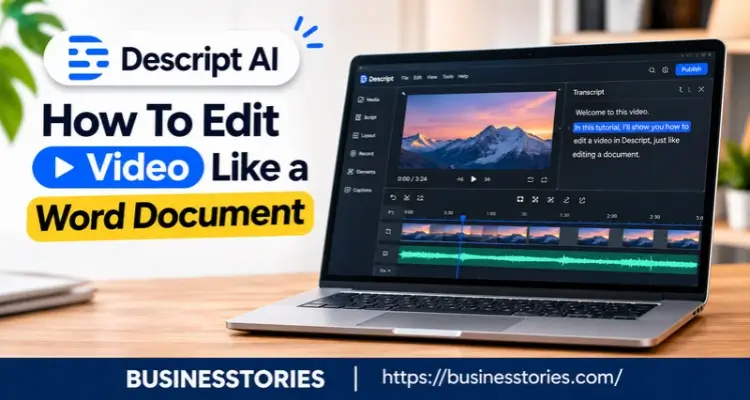
Video editing used to feel like a job for experts. You had to scrub through timelines, hunt for the right frame, and learn dozens of shortcuts. But what if you could fix a video the same way you fix a typo? That is the big idea behind Descript AI.
In short, Descript turns your speech into text. Then you edit the text, and the video follows. Delete a sentence, and that clip disappears. Move a paragraph, and the footage moves with it. As a result, editing starts to feel more like writing than engineering.
In this guide, you will learn what is Descript AI, how it works, and which Descript AI features matter most. We will also cover 2026 pricing and give you a simple plan to start today. So whether you run a podcast, a YouTube channel, or a small business, you will know if this tool fits your workflow.
What Is Descript AI? The Story Behind the Tool
Descript AI is an audio and video editor built on one simple rule: your transcript is your edit. Instead of dragging clips across a timeline, you change words on a page. Then the software updates the media to match.
Where the Idea Came From
Interestingly, Descript did not start as a video tool. Groupon founder Andrew Mason launched it in 2017. At the time, he also ran Detour, a startup that made audio tours. His team noticed something odd.
In fact, editing their voice-over sessions took about twice as long as recording them. On top of that, they needed a trained sound engineer for every edit. So Mason built a tool that let anyone edit audio by editing text.
How the Company Grew
After that, the idea caught on fast. First, Andreessen Horowitz backed the launch with $5 million in seed money. Later, in November 2022, the OpenAI Startup Fund led a $50 million Series C.
That round brought total funding to about $100 million. Meanwhile, big newsrooms such as the BBC, NPR, and The New York Times began to use it.
Today, the tool covers far more than podcasts. For example, it now handles screen recording, AI voices, social clips, and team editing. In May 2026, Descript also opened its API in beta. As a result, teams can plug it into their tools and automate parts of their work.
A Fresh Way to See It
Here is a point most reviews miss. Descript does not just save time. Rather, it moves editing from a technical skill to an editorial one. You no longer need to know where a cut goes on a waveform.
Instead, you need to know what story you want to tell. In other words, if you can judge a good sentence, you can now judge a good edit. That shift explains why writers, marketers, and teachers pick up this AI video editor so quickly.
How Descript AI Lets You Edit Video Like a Word Document
So how does the software actually work? The process has three simple stages. Once you see them, the whole tool makes sense.
Stage 1: The AI Transcribes Your Media
First, you upload or record your audio or video. Then Descript’s AI listens and writes out every word. It also labels who is speaking. For clean audio with one speaker, accuracy is high.
According to a 2026 review by Sonix, it lands around 92% to 95% for clear English speech. However, accuracy drops to about 80% when people talk over each other.
Stage 2: You Edit the Text
Next, the transcript appears like a normal document. Now you can edit it as you do in Google Docs. For example:
- Delete a sentence, and that part of the video vanishes.
- Cut and paste a paragraph, and the clip moves to its new spot.
- Search for a word to jump directly to that moment.
- Highlight a line and turn it into a short social clip.
Because every word links to a point in time, you never have to scrub through footage to find a mistake.
Stage 3: The Video Updates on Its Own
Finally, Descript syncs every text change with the audio and video. You still get a timeline for fine-tuning, like adding music or B-roll. But for most spoken content, the transcript does the heavy lifting.
Why This Matters for Your Workflow
Think about a 30-minute interview. With a classic editor, you might watch it two or three times just to find the weak parts. With text-based video editing, you can skim the transcript in a few minutes. Then you can trim the slow sections the way you would trim a draft.
Here is a practical tip most guides skip. If you record a podcast with guests, give each person their own mic and track. That way, fewer voices overlap, the transcript stays cleaner, and your text edits land in the right place.
In short, a little care while recording saves a lot of cleanup later.
7 Descript AI Features That Save You Hours
Text editing is the core. Yet the real magic comes from the AI tools built around it. Here are seven Descript AI features worth knowing in 2026.
1. Underlord, Your AI Co-Editor
Underlord is Descript’s built-in AI assistant. You simply type what you want, such as “remove long pauses and add captions.” Then it makes a plan and does the work. It first arrived in April 2025, and it keeps getting smarter.
For instance, in July 2026, Descript added Anthropic’s Claude Opus 5 as a model choice inside Underlord. Still, it is in beta, so check its work before you publish.
2. Studio Sound
Did you record in a noisy kitchen? Studio Sound removes background noise and echo in one click. As a result, a cheap mic can sound like a studio setup.
3. Remove Filler Words
This tool finds every “um”, “uh”, and “you know” in seconds. Then you review the list and delete them all at once. Furthermore, you can cut long silences the same way.
4. Overdub and AI Speech
Did you say the wrong date? Just type the right word. Then Descript clones your voice and fills it in. It even tries to match your lip movements on video. However, it works best for short fixes, not full paragraphs.
5. Eye Contact
Reading from a script often makes your eyes drift. So this feature shifts your gaze to make you look at the camera. It works best on straight-on shots.
6. Green Screen
You do not need a real green screen. Instead, the AI removes your background so you can swap in a new one. Furthermore, proper lighting gives the cleanest result.
7. AI Clips
Finally, this tool scans a long video and pulls out the best moments. Then it resizes them for TikTok, Reels, or Shorts. That makes turning long videos into short clips much faster.
A Word of Caution on Voice Cloning
Here is an angle a few reviews cover. Voice cloning is powerful, but it is also personal. So use it only on your voice or with clear consent. Furthermore, tell your audience when large parts of a video use AI speech. Being open protects your trust, and trust is difficult to regain.
Descript AI Pricing in 2026: Which Plan Fits You?
Price matters, so let’s break it down. Descript changed its pricing in September 2025. Since then, plans have used two metrics: media minutes and AI credits.
Media Minutes vs AI Credits
Media minutes cover how much audio or video you upload or record. AI credits, on the other hand, pay for AI actions like Underlord prompts or voice cloning. Therefore, a plan may exhaust its credits before depleting its minutes, or vice versa.
The Descript AI Five Plans at a Glance
Here are the 2026 prices, based on Sonix’s pricing breakdown:
| Plan | Billed Yearly | Billed Monthly | Best For |
| Free | $0 | $0 | Testing the tool |
| Hobbyist | $16/month | $24/month | Casual creators |
| Creator | $24/month | $35/month | Weekly podcasters and YouTubers |
| Business | $50/month | $65/month | Teams and agencies |
| Enterprise | Custom | Custom | Large companies |
The free plan gives you 60 media minutes a month. It also includes 100 AI credits, but those are one-time and do not renew. Meanwhile, the Creator plan includes 800 AI credits each month and full Underlord access.
How to Pick the Right Plan
First, track your real use for one month on the free plan. Then check two numbers: how many minutes you edit and how many AI actions you take. If you mostly cut text and clean audio, Hobbyist may be enough. But if you lean on Underlord, clips, and voice tools, Creator is the safer pick.
The Hidden Cost to Watch
Here is something many buyers learn too late. AI credits are where costs creep up. For example, each Underlord prompt uses credits for its “thinking,” plus credits for the actions it takes.
So if you love giving Underlord big tasks, watch your usage tab in the first few weeks. Additionally, choosing yearly billing can save you approximately one-third compared to monthly billing. Yet only commit once you know your pattern.
How to Start With Descript AI in 5 Simple Steps
Ready to try it? Here is a simple plan you can follow today.
Step 1: Create a Free Account
First, go to descript.com and sign up. Then download the desktop app or use it in your browser. You do not need a credit card to start.
Step 2: Upload a Short Test Clip
Next, pick a video that runs three to five minutes. A short clip helps you learn fast without burning through your free minutes. Then wait a moment while Descript writes out the transcript.
Step 3: Make Your First Text Edits
Now read the transcript. Delete one weak sentence. Then move one paragraph to a new spot. Afterwards, play the video back and watch how the cuts follow your text.
Step 4: Try Two AI Tools
Thereafter, run Remove Filler Words and Studio Sound. These two tools show the clearest before-and-after results. Furthermore, open Underlord and ask it for one simple task, like adding captions.
Step 5: Export and Compare
Finally, export your clip and compare it to the original. Then ask yourself one question: how long would the same task have taken in your old editor? That answer tells you if Descript is worth paying for.
Who Should Use It, and Who Should Not
Descript shines as podcast editing software and for interviews, tutorials, webinars, and talking-head videos. In other words, it is perfect when speech drives the story.
However, it is not the best fit for music videos, action footage, or heavy color work. For those jobs, a timeline editor like Premiere Pro or DaVinci Resolve still wins.
A Smarter Way to Use Descript AI
Here is one last tip. Write a rough script before you record. Then, after recording, compare the transcript with your script. As a result, you will spot missing points and repeated lines in minutes. That small habit turns Descript from an editor into a full writing partner.
Conclusion: Is Descript AI Right for You?
To sum up, Descript AI changes how video editing feels. Instead of fighting with a timeline, you edit words on a page. Then the video follows your changes.
We covered a lot in this listicle.
- First, you learned what Descript is and how Andrew Mason built it to fix his editing pain.
- Next, you saw how its three-stage process turns speech into text you can edit.
- Then we walked through seven key features, from Underlord to Studio Sound.
- After that, we broke down 2026 pricing and the hidden cost of AI credits.
- Finally, you got a five-step plan to start today.
The main lesson is simple. Descript makes editing a thinking task, not just a technical one. So if you can shape a good story in writing, you can now shape a good video too. That is a big win for podcasters, marketers, teachers, and small teams.
Still, no tool is perfect. Accuracy dips when voices overlap, and AI features need a quick review. So treat the AI as a helpful co-editor, not a stand-in for your judgment.
Your next step: sign up for the free plan and edit one short clip this week. Then time yourself. If you save even 30 minutes, Descript has earned a spot in your workflow.
Frequently Asked Questions
1. Is Descript AI free to use, or do you need a paid plan to edit video?
Yes, Descript AI has a free plan. It includes 60 media minutes a month and core tools like transcription and Studio Sound. However, voice cloning, more AI credits, and longer projects need a paid plan.
2. How accurate is Descript AI transcription for podcasts and interviews?
For clear, single-speaker English audio, Descript transcription accuracy runs around 92% to 95%. But it drops to about 80% when people talk over each other. So separate mics help a lot with podcast transcription.
3. Can Descript AI replace Premiere Pro for editing long YouTube videos?
For talking-head YouTube videos, Descript can handle most of the work. Still, Premiere Pro wins for complex colour grading, effects, and action footage. Many creators cut in Descript first, then polish elsewhere.
4. Is Descript AI voice cloning safe to use for fixing audio errors?
Yes, Overdub works well for fixing small mistakes like a wrong word or date. Furthermore, Descript asks you to verify your voice first. Use AI voice cloning only with consent, and tell viewers when needed.
5. What is the easiest way to learn Descript AI as a complete beginner?
Start with a short three- to five-minute clip on the free plan. Then delete a sentence, move a paragraph, and try to remove filler words. This simple, descriptive tutorial approach teaches the basics in one hour.

Tabassum Shaik is an Author, Researcher, and SEO Specialist with over 8 years of experience creating informative content on business, startups, entrepreneurship, marketing, technology, and digital trends. She specializes in researching industry trends and transforming complex topics into practical, easy-to-understand insights. Her goal is to help readers stay informed, learn new ideas, and make better business decisions.