Introduction
Every e-commerce store loses money to hidden errors. These errors break checkout pages. They freeze payment forms. They crash product listings. And most of the time, your customers never say a word. They leave. Then they buy from a competitor. Noibu solves this problem directly.
It monitors your entire e-commerce store 24/7. It catches every error. Then it tells you exactly how much each problem costs your business. But Noibu goes further than most tools. Instead of ranking errors by how often they happen, Noibu ranks them by revenue impact. So your team always works on the most costly problems first.
This approach saves time. It also saves money. This article outlines 10 key reasons why Noibu is the preferred go-to platform for e-commerce error monitoring. We also share real case study results and practical tips. So by the end, you’ll know exactly what Noibu does and whether it’s right for your store.
1. What Is Noibu, and Why Does It Matter?
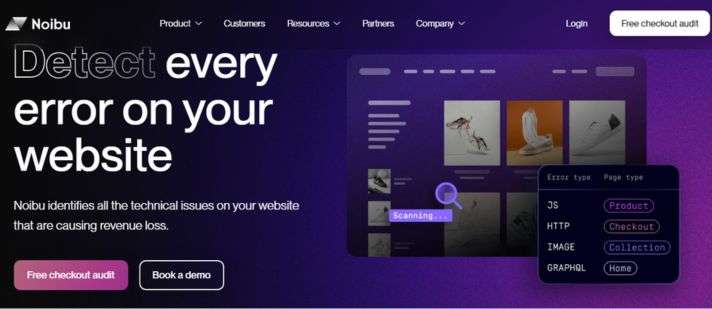
Noibu is an e-commerce monitoring platform. It detects every front-end error on your online store. Then it groups those errors. Thereafter, it ranks them by how much revenue they put at risk.
Most error monitoring tools were built for software engineers. They focus on logging and frequency. But Noibu was built specifically for e-commerce teams. It focuses on one thing: protecting your revenue.
Here’s why this focus matters. A rare payment error might affect only 0.4% of your sessions. A generic tool would bury that issue at the bottom of a long list. But that small error could block thousands of checkouts every year. Noibu catches it immediately. Then it puts it right at the top of your dashboard.
Because of this approach, Noibu has saved its customers more than $1.8 billion in annual revenue. It has also detected well over 100 billion errors across the stores it monitors. These numbers show the scale of the problem and the power of the solution.
In short, Noibu answers one simple question for every e-commerce team: What’s broken on my site, and how much is it costing me?
2. How Noibu Captures 100% of Front-End Errors
Most monitoring tools use sampling. They capture only a portion of sessions, sometimes just 10%. For basic analytics, that’s fine. But for checkout monitoring, sampling is dangerous.
Here’s the problem. The most costly bugs are often rare. They might appear in only 1% of sessions. So if your tool samples just 10%, it completely misses that bug. Meanwhile, customers continue to lose orders. And you never find out why.
Noibu captures 100% of sessions. No sampling and session caps. No blind spots. Every JavaScript error, HTTP failure, payment issue, and broken image gets recorded every single time.
Additionally, Noibu captures e-commerce-specific signals. These are errors that general infrastructure tools miss entirely. Things like failed coupon codes, broken add-to-cart buttons, and redirect failures after payment. These errors don’t always look like “errors” to generic tools. But they absolutely hurt conversions.
Furthermore, because Noibu records everything, your team never has to wonder if they missed something important. The data is complete. The picture is clear. So decisions are faster and more confident.
Unique Insight: Most teams don’t realize their tool is sampling sessions until they switch to 100% capture. Store Supply Warehouse discovered critical issues only after deploying Noibu. The issues their previous tools had never surfaced.
3. Revenue-Impact Prioritization: The Noibu Difference
This feature is where Noibu truly stands out. Traditional tools rank errors by how often they occur. A button that breaks 500 times a day ranks high. A payment error that breaks 20 times a day ranks low. But the payment error is far more costly.
Noibu flips this logic entirely. It ranks every issue by predicted annual revenue loss. Your dashboard shows the most costly issue on your site, not the noisiest.
Here’s how Noibu calculates revenue impact.
- First, Noibu identifies the number of sessions that encountered the error.
- Then, it checks where in the funnel those sessions are.
- Thereafter, it applies the typical conversion rate for that funnel stage.
- Finally, it multiplies these numbers to estimate revenue at risk.
For example, a checkout error affecting 50 sessions per day, at an average order value of $150, could cost your store over $1 million per year. Noibu surfaces that number clearly. So your team immediately understands the urgency.
This revenue-first approach also helps with internal buy-in. When engineers can show leadership that a bug is costing $50,000 per month, fixing it becomes a priority. The conversation shifts from “when can we get to this?” to “we fix this today.”
4. AI-Powered Error Grouping That Saves Hours
One broken script can create thousands of individual error events. The same bug might fire across different browsers. It might fire on different devices. It might appear on multiple pages. But it’s still just one underlying problem.
Without smart grouping, your engineering team drowns in noise. They might spend days triaging what looks like hundreds of separate issues. Then they finally discover it was the same bug all along.
Noibu uses AI-powered grouping to resolve the problem. It automatically collapses thousands of related error events into one single, clean issue. Each grouped issue comes with an AI-generated explanation. Engineers understand the problem instantly, without decoding cryptic error codes.
On top of that, Noibu assigns every grouped issue a funnel-stage tag. So you know whether the problem is on the product listing page, the cart, or the checkout screen. This context makes it easy to triage fast.
Because of this smart grouping, what used to take 10 hours per week now takes just 2 hours. That’s a real result from Store Supply Warehouse, a BigCommerce merchant that deployed both Noibu and BigCommerce together. Their team went from spending 10 hours weekly on error identification to just 2 hours—freeing them to focus on growth instead of firefighting.
5. Session Replay and Root-Cause Analysis
Knowing that an error happened is useful. But knowing exactly why it happened is even better. That’s where session replay comes in.
Noibu records every user session. So when an error occurs, you can watch a replay of exactly what the customer did. You see them browse products. You see them add items to the cart. Then you see the exact moment the error fires.
This removes all guesswork from debugging. Instead of spending hours trying to recreate the problem, engineers skip straight to the fix. The recreation is already done for them.
Moreover, each session replay comes with full technical context. Stack traces show the exact line of code that failed. HTTP payloads reveal network problems. Browser and device breakdowns explain compatibility issues. All of this information sits in one place. There’s no switching between tools.
Additionally, Noibu stores session replays for 90 days. So if a bug gets reported by a customer days after it occurred, your team can still go back and watch exactly what happened. This feature is especially beneficial for recurring or intermittent issues.
Unique Insight: Noibu also includes a “Help Code” feature. Support teams generate a code while speaking with a customer. That code instantly pulls up the exact session, the exact error, and all technical details. This eliminates the painful back-and-forth of “What browser are you using?”
6. Checkout Monitoring and Payment Error Visibility
Checkout errors are the most damaging errors in e-commerce. They happen at the exact moment a customer is ready to buy. Then the experience breaks. And the sale disappears.
Noibu maps every error to a checkout funnel stage. These stages include the product listing page, the product detail page, the cart, the checkout screen, and the confirmation page. Each stage has different error types. Each stage has a different revenue impact.
At checkout specifically, Noibu monitors form validation errors, payment gateway failures, redirect issues, and cart abandonment triggers. Because of this profound visibility, your team knows exactly where customers are dropping off—and why.
Here’s a helpful example. Suppose customers using a specific credit card can’t complete payment. To generic analytics tools, the issue looks like normal cart abandonment. But with Noibu, you see the exact payment error. You see which sessions it affected. You see the revenue at risk. Then your team fixes it fast.
Furthermore, Noibu also detects friction points that aren’t technically “errors.” Rage clicks, for instance, happen when frustrated customers click a button repeatedly because nothing is happening. Noibu flags these moments. This helps your team find UX problems before they turn into lost sales.
7. Real-Time Alerts That Keep Your Team Ready
Finding an error is only useful if your team acts on it quickly. Real-time alerts make sure nothing slips through the cracks.
Noibu sends instant notifications through Slack, Microsoft Teams, email, or webhooks. The right person receives an immediate alert when a critical checkout error occurs. The alert includes everything they need. Which page is affected, how many customers are impacted, the estimated revenue cost, and a direct link to the issue.
On top of that, alert rules are fully customizable. Maybe your team only wants notifications for checkout errors above a certain revenue threshold. Or maybe you want to exclude issues from your staging environment. Noibu lets you set these rules precisely.
Additionally, Noibu integrates directly with Jira. When you escalate an issue, Noibu automatically creates a Jira ticket. Full error context is attached to the ticket instantly. So engineers open the ticket and already have everything they need to start fixing the problem.
This tight integration means the gap between “error detected” and “ticket created” is nearly zero. As a result, your mean time to resolution drops significantly.
8. Noibu vs. Generic Error Monitoring Tools
Many teams already use tools like Sentry, LogRocket, or FullStory. So it’s worth asking: why switch to Noibu?
The core difference is purpose. Generic tools were built for software engineers managing applications. Noibu was built for e-commerce teams managing revenue.
Let’s compare them side by side.
| Feature | Generic Tools | Noibu |
| Session Capture | Sampled (10–20%) | 100%—no sampling |
| Error Ranking | By frequency | By revenue impact |
| Checkout Focus | Limited | Deep, funnel-mapped |
| Session Replay | Available | Available + technical context |
| Revenue Estimate per Bug | Not available | Automatic |
| Jira Integration | Partial | Full, with context |
| AI-Powered Grouping | Basic | Advanced, funnel-tagged |
Because of these differences, teams that switch from generic tools to Noibu often discover high-impact bugs they never knew existed. What about the checkout errors hidden in the bottom 10% of unsampled sessions? Noibu finds them on day one.
Furthermore, generic tools give you data. Noibu gives you decisions. There’s a big difference between seeing a list of errors and knowing exactly which one to fix first.
9. BigCommerce Partnership and Platform Integration
Noibu works with all major e-commerce platforms. But its partnership with BigCommerce shows just how powerful deep platform integration can be.
Together, Noibu and BigCommerce built a one-click integration. BigCommerce merchants connect their stores to Noibu in seconds. The lightweight monitoring script starts working immediately. No complex setup. No developer resources required.
Beyond merchant-level benefits, the partnership goes even deeper. Noibu’s engineers work directly with BigCommerce’s development team. Together, they monitor the platform itself for errors affecting multiple merchants at once.
In one notable example, Noibu’s monitoring detected that 99.6% of errors across BigCommerce stores were isolated to individual storefronts. The remaining 0.4% were platform-level issues affecting multiple merchants. By identifying these shared problems early, Noibu helped BigCommerce fix them before they spread further.
Brands like DEMDACO, MEC, King Arthur Baking, Store Supply Warehouse, and SportsShoes all benefit from this joint solution. These aren’t small stores. They’re high-volume retailers with complex needs. And they trust Noibu to protect their revenue every day.
10. Performance Monitoring and Core Web Vitals
Fast pages convert better. In fact, even a 100-millisecond delay can reduce conversions noticeably. So performance monitoring is just as important as error monitoring for e-commerce success.
Noibu measures Core Web Vitals using real customer traffic. These include:
- Largest Contentful Paint (LCP): How quickly does the main content load?
- Cumulative Layout Shift (CLS): Does the page shift around while loading?
- First Input Delay (FID): How fast does the page respond to a click?
Moreover, Noibu doesn’t just measure these metrics. It quantifies the revenue cost of poor performance. If a slow product page causes visitors to leave, Noibu estimates how much revenue that costs. This makes performance optimization a business decision, not just a technical one.
Additionally, Noibu identifies which third-party scripts slow your pages down most. Analytics tags, live chat widgets, and ad pixels often add significant load time. Noibu shows you exactly which ones hurt performance. Then your team can decide whether to keep, remove, or defer them.
Better Core Web Vitals also improve your Google rankings. Higher rankings bring more organic traffic. More traffic means more potential revenue. So fixing performance issues with Noibu pays off in multiple ways.
11. Noibu AI Agents: The Future of E-Commerce Monitoring
Noibu is not just a passive monitoring tool. It has evolved into an active improvement engine for e-commerce stores. The latest addition to its platform is AI Agents.
These agents run continuously in the background. Each one owns a specific outcome. One agent focuses on conversion. Another handles page speed. A third manages ad spend efficiency. And another monitors compliance.
Here’s what makes these agents unique. They don’t just surface problems. They find the work, do the work, and hand you the results for approval. No need to dig through dashboards. No need to write prompts and manually triage alerts.
For example, if the conversion agent detects a drop in checkout completions, it investigates the cause automatically. Then it surfaces a recommended solution with full supporting context. Your team reviews it. Then they approve it. That’s it.
Because of this automation, e-commerce teams become dramatically more efficient. Tasks that once required 10 hours per week now take just 2 hours. Teams focus on strategy. Noibu handles the monitoring and diagnosis.
Unique Insight: Most monitoring platforms tell you what’s wrong. Very few tell you what to do about it. Noibu’s AI Agents bridge that gap—turning insight into action, with your approval.
Conclusion
Noibu is more than just an error monitoring tool. It is a complete revenue protection platform for e-commerce businesses of all sizes.
Throughout this article, we covered the 11 key features that make Noibu stand out.
- First, it captures 100% of front-end errors with no sampling.
- Then it ranks those errors by revenue impact.
- Next, it uses AI to group related issues automatically.
- Thereafter, session replay gives your engineers full context to resolve problems fast.
Noibu also goes beyond errors. It monitors checkout funnels, page performance, and customer friction. It sends real-time alerts to your existing tools. And now, its AI agents actively work to improve your store around the clock.
The results speak clearly. Noibu has saved over $1.8 billion in annual revenue for e-commerce businesses worldwide. Clients like Store Supply Warehouse cut error resolution time from 10 hours to just 2 hours per week. And merchants across platforms like BigCommerce, Shopify, and WooCommerce rely on it every single day.
If your store handles any real volume, hidden checkout errors are almost certainly costing you money right now. The good news is, you can find them today.
Frequently Asked Questions
Q1: How does Noibu rank errors differently from other tools?
Noibu ranks every error by its predicted annual revenue loss, rather than by how often it occurs. This means your team always fixes the most costly checkout issues first, not just the noisiest ones.
Q2: Can Noibu work with my existing e-commerce platform?
Yes. Noibu integrates with Shopify, BigCommerce, WooCommerce, and custom builds. A lightweight script installs easily on any storefront, regardless of your current tech stack or setup.
Q3: Does Noibu capture 100% of sessions or just a sample?
Noibu captures 100% of sessions—no sampling at all. This is critical because rare checkout errors with significant revenue impact often hide in the sessions that sampled tools completely miss.
Q4: How fast can my team resolve issues after Noibu detects them?
Very fast. Noibu provides full session replays, stack traces, and AI-generated fix suggestions in one place. Engineers skip the guesswork and move directly to the solution, cutting resolution time significantly.
Q5: Is customer payment data safe with Noibu’s session replay?
Yes. Noibu automatically masks all sensitive data in session replays. Payment details, passwords, and personal information are never recorded or stored, keeping your customers fully protected at all times.

Tabassum Shaik is an Author, Researcher, and SEO Specialist with over 8 years of experience creating informative content on business, startups, entrepreneurship, marketing, technology, and digital trends. She specializes in researching industry trends and transforming complex topics into practical, easy-to-understand insights. Her goal is to help readers stay informed, learn new ideas, and make better business decisions.