
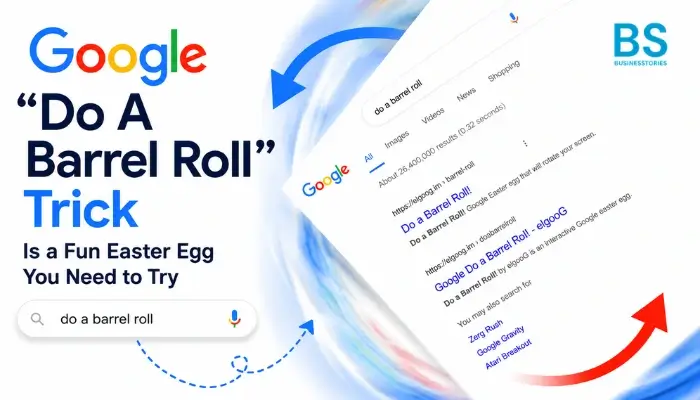
Have you ever wanted to make Google do something wild and unexpected? Well, you are in luck! “Do a barrel roll” is one of Google’s most beloved hidden tricks. It has been making users smile since 2011. With just a few keystrokes, you can watch your entire search page spin a full 360 degrees. Best of all, it is free, and it takes less than five seconds to try.
In this guide, you will learn what this trick is and where it came from. You will also learn how to activate it and how to take the fun even further. For example, you can try exciting variations like “do a barrel roll x200” and “do a barrel roll 20 times.” So whether you are a first-timer or a Google Easter egg fan, this article has everything you need.
What Is the “Do A Barrel Roll” Google Easter Egg?
First, let us start with the basics. “Do a barrel roll” is a Google Easter egg. In other words, it is a hidden feature that Google engineers built into the search engine just for fun. When you type “do a barrel roll” into Google’s search bar and press Enter, the results page spins a full 360 degrees. Then, it immediately returns to its normal state.
But first, what exactly is an Easter egg in tech? Simply put, an Easter egg is a hidden joke or surprise inside a computer program. For example, Easter eggs can be images, animations, or even small mini-games. In short, they are secret little gifts from developers to users.
So, when did this trick appear? Google introduced it in November 2011. It was such a hit that it spread rapidly across the internet. As a result, people posted it on Twitter, shared it on Facebook, and created memes about it. Even today, over a decade later, it still works perfectly.
What makes this Easter egg so special? Above all, it is its simplicity. You do not need coding knowledge. You do not need to install anything. Instead, you just type a phrase, hit Enter, and enjoy the show. Furthermore, the animation is purely visual. This means links remain clickable, and the page stays usable throughout the spin. When the spin ends, everything returns to normal right away.
Moreover, this trick works across all kinds of devices. It works not only on laptops and computers but also on tablets and phones. So no matter what device you use, you can enjoy this fun little Easter egg anytime.
The Fascinating Origin of the Barrel Roll Trick
You might be wondering, “Why ‘do a barrel roll’?” Well, the answer takes us back to a classic video game era. Specifically, this trick is inspired by the Star Fox video game series, and it all started with one very famous rabbit.
More specifically, the phrase comes from Star Fox 64, a beloved Nintendo 64 game from the 1990s. In the game, pilot Fox McCloud and his team defend a galaxy called the Lylat system. One key character, Peppy Hare, would tell the player, “Do a barrel roll!” To achieve this, players had to press Z or R twice on the controller. As a result, their spacecraft would spin a full 360 degrees to dodge enemy fire.
Over time, this line became a widely known internet meme. Then, in 2011, Google made it truly legendary. They turned the phrase into a live, interactive Easter egg on the world’s biggest search engine. When Google first launched the trick, the internet collectively paused, blinked, and then cheered.
Interestingly, the animation is powered by CSS3. This is a presentation feature built into modern browsers like Chrome and Firefox. So Google engineers designed it to be both playful and a quiet showcase of modern web technologies. In other words, it is not just entertaining — it is also technically clever.
How to Do a Barrel Roll on Google: Step-by-Step Guide
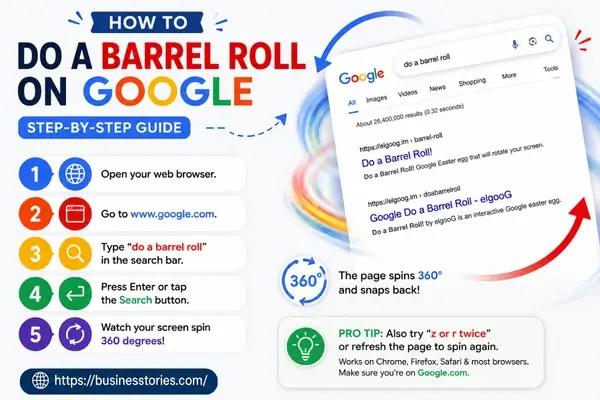
Ready to try it yourself? Great news, it is incredibly easy! Here is exactly how to activate this playful Easter egg in just a few seconds.
Step 1: First, open your favorite web browser on your phone, tablet, or computer.
Step 2: Next, go to www.google.com.
Step 3: Then, click on the search bar and type “do a barrel roll.”
Step 4: After that, press Enter (or tap the Search button on mobile).
Step 5: Finally, watch your screen spin a full 360 degrees and enjoy the moment!
As soon as the results page loads, the whole screen rotates smoothly in a 360° animation. Then it snaps back to normal. It is quick, clean, and very satisfying to watch.
Additionally, you can trigger the same effect by typing “z or r twice” into the search bar. This works because it references the classic Star Fox game directly. In the game, players pressed Z or R twice to perform the move.
Furthermore, do you want to see it again? Simply press F5 or click the refresh button on your browser. Each new Google search technique will trigger the animation one more time.
Pro Tip: This trick works on Google Chrome, Firefox, Safari, and most modern browsers. Please ensure you are searching on Google.com for optimal results.
Do a Barrel Roll Multiple Times: Exciting Variations to Try
Here is where things get really exciting. Google’s built-in Easter egg only spins the page once per search. However, what if you want to spin it multiple times? Fortunately, that is where fan-made tools and third-party sites come in, and they are brilliant.
Do a barrel roll 20 times.
Want a little more dizziness? Then try doing a barrel roll 20 times! Enhanced versions of this trick give you much more control. For instance, you can choose to spin the page 20 times, 200 times, or even 1,000 times. You can also pick a fast or slow rotation speed.
To try to do a barrel roll 20 times, simply visit a site like elgoog.im/doabarrelroll or do-a-barrel-roll.github.io. Then select the 20-spin preset. After that, sit back and watch your screen go wild for about 20–25 seconds. It is also a hilarious prank to pull on a friend who has never seen it before!
Do a barrel roll x200.
Now we are talking seriously about spinning! “Do a barrel roll x200″ is one of the most popular and entertaining variations of this Easter egg. Instead of spinning once, the animation repeats about 200 times. As a result, your screen becomes a fast and dizzying whirlwind of motion. In fact, a barrel roll x200 takes roughly 200–250 seconds to complete.
Moreover, fan-made sites offer even more spin options. For example, you can choose x3, x5, x10, x100, x200, x1000, x2000, and even x100,000 or infinite times. So there is truly no limit to how many times you can spin!
Other Popular Spin Counts
Beyond 20 and 200, there are even more fun variations to try. Here are some excellent options available on third-party barrel roll sites:
- Do a barrel roll twice: A quick double spin that is perfect for beginners.
- A barrel roll 10 times: A fun mid-level option that is still manageable.
- Do a barrel roll 100 times: Pure chaos, but in the best way possible.
- Do a barrel roll 1 million times: Definitely not for the faint of heart!
Furthermore, third-party versions let you adjust speed and direction too. So you can craft custom spin sequences and truly turn the Easter egg into your own little playground.
Other Hilarious Google Easter Eggs Worth Exploring
Since you are already in Easter egg mode, why stop at just one? Luckily, Google has dozens of hidden tricks waiting to be found. Here is a brief look at some other crowd favorites worth trying.
Google Gravity: First, type “Google Gravity” into the search box. Then click the “I’m Feeling Lucky” button. Finally, click anywhere on the screen and watch everything collapse and fall!
Askew or Tilt: Simply type “askew” or “tilt” into the search bar. As a result, the entire results page appears slightly crooked and tilted to one side.
Zerg Rush: Type “Zerg Rush” into Google. Then defend your search results from invading “O”s that eat through the page. It is inspired by the classic game StarCraft.
Anagram: Search the word “anagram,” and Google cheekily suggests “nag a ram” as an alternative. In other words, Google’s response is itself an anagram!
Flip a Coin or Roll a Dice: These simple built-in tools let Google make a random decision for you instantly. So next time you cannot decide something, just ask Google!
Overall, each of these tricks shows the fun and human side of Google’s engineering team. They remind us that even the world’s biggest search engine alternatives can have a great sense of humor.
Why Does Google Create Easter Eggs Like This?
You might wonder why a trillion-dollar company spends time building hidden spinning animations. Actually, the answer is both simple and smart.
First and foremost, Easter eggs like “do a barrel roll” make users happy. A quick surprise or a laugh builds goodwill. When you smile at Google’s trick, you naturally feel a little closer to the brand. As a result, you are more likely to continue using the product.
Second, these Easter eggs show off technical skill. Specifically, the barrel roll trick uses CSS3—a powerful feature of modern browsers. So Google is essentially saying, “Look what our platform can do.” But instead of a boring technical demo, they deliver it as pure fun.
Third, Easter eggs generate organic buzz. For example, when the barrel roll went viral in 2011, thousands of people posted about it online. That kind of word-of-mouth excitement is priceless. Therefore, a small Easter egg can have a huge marketing impact.
Finally, and perhaps most importantly, these hidden features remind us that technology can be joyful. Even in 2026, the “do a barrel roll x200″ trick still captures people’s attention. Despite the world’s current focus on AI and advanced search features, people still cherish a simple, unexpected moment of delight. In summary, the unique combination of power and playfulness is what sets Google apart.
Conclusion: Keep Spinning With Do a Barrel Roll
There are very few things on the internet that are this simple and so universally loved. Do a barrel roll is more than just a trick. In fact, it is a genuine piece of internet history. From its roots in Star Fox 64 to its viral debut on Google in 2011 to its ongoing popularity today, this Easter egg has truly stood the test of time.
Whether you try it once for a quick laugh, repeat “do a barrel roll” 20 times to amaze your friends, or go all out with “do a barrel roll” x200 for maximum spinning madness, there is something here for everyone. Above all, this trick is a reminder that the best experiences are often the simplest ones.
Please take a moment to open Google and type “do a barrel roll.” Press Enter and witness the magic unfold. Thereafter, share it with a colleague, a friend, or your kids. Watch their reaction. That moment of surprise and joy is precisely what Google intended when they built this little Easter egg so many years ago.
Additionally, take the opportunity to explore the other Google Easter eggs mentioned in this guide. You will be genuinely surprised by the amount of fun that is readily available.
Did this article help you discover something new? If so, share it with a friend and spread the fun!
FAQs About Do A Barrel Roll on Google
Q1. What does “do a barrel roll” mean on Google?
When you type “do a barrel roll” into Google Search and press Enter, the results page spins a smooth 360 degrees. Then it returns to normal. Google first introduced this amusing Easter egg trick in November 2011, and it still works today.
Q2. Can I do a barrel roll multiple times on Google?
Google’s built-in Easter egg spins the page only once per search. However, you can visit third-party sites like elgoog.im to spin the page multiple times. For example, popular variations include doing a barrel roll 20 times or even 1,000 times.
Q3. How do I try to do a barrel roll x200?
Simply visit a fan-made site such as elgoog.im/doabarrelroll and select the x200 preset. As a result, your screen will spin 200 times rapidly. It creates a wild, dizzying, and very entertaining visual effect that lasts a few minutes.
Q4. Does the “do a barrel roll” trick work on mobile phones?
Yes, absolutely! The trick works on smartphones and tablets, too. Simply open Google in your mobile browser, type “do a barrel roll,” and tap Search. The page will spin just like it does on a desktop computer.
Q5. Where did the phrase “do a barrel roll” originally come from?
The phrase comes from the classic Nintendo 64 game Star Fox 64. A character named Peppy Hare told players to “do a barrel roll” by pressing Z or R twice. Later, in 2011, Google turned this iconic gaming phrase into a fun search engine Easter egg.

Tabassum Shaik is an Author, Researcher, and SEO Specialist with over 8 years of experience creating informative content on business, startups, entrepreneurship, marketing, technology, and digital trends. She specializes in researching industry trends and transforming complex topics into practical, easy-to-understand insights. Her goal is to help readers stay informed, learn new ideas, and make better business decisions.