Introduction
AI tools for social media are changing how brands create posts, reply to followers, and track results. Today, you do not need a giant team to stay active online. Instead, you can use smart tools to save time, stay consistent, and improve your content quality.
In this guide, we will look at 10 of the best AI tools for social media. We will also explain what each tool does, who it helps, and how it can boost content, engagement, and growth. If you want a simple way to work faster and post better, this list will help you choose the right tool.
10 Best AI Tools for Social Media
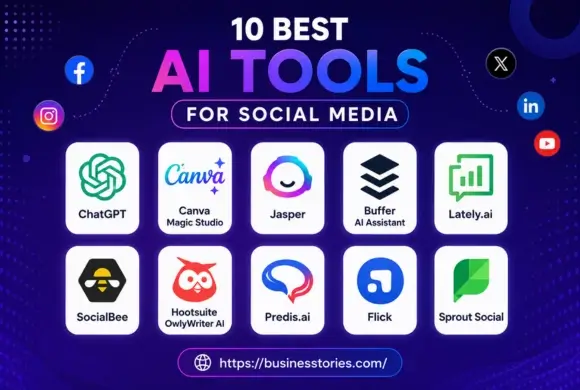
Below is the list of tools. Each one solves a real task. In addition, each tool can fit a different stage of your workflow.
1. ChatGPT
ChatGPT is one of the most flexible AI tools for social media. It helps you write captions, brainstorm post ideas, create content calendars, and even rewrite text in a better tone. Because it works fast, it is useful for marketers who need ideas on demand.
For example, if you manage a small business page, you can ask ChatGPT for 10 Instagram caption ideas, a LinkedIn post, or a short reply to a customer comment. As a result, you spend less time staring at a blank screen. You also keep your brand voice more consistent.
However, the best results come when you give clear prompts. For instance, ask for “friendly captions for a fitness brand” instead of a vague request. Therefore, ChatGPT works best as a creative partner, not a full replacement for human editing.
2. Canva Magic Studio
Canva Magic Studio is a fantastic choice for social media design. It lets you make posts, stories, carousels, and ads with simple drag-and-drop tools. In addition, its AI features can help you write copy, remove image backgrounds, and turn ideas into polished visuals.
This tool is helpful for teams that want quick designs without hiring a designer. For example, a local cafe can make a weekly promo post in minutes. A coach can also quickly create a clean quote graphic for Instagram or Facebook.
Because visual content gets more attention, Canva helps improve engagement. It also supports faster publishing, which matters when you need to stay active on several platforms.
3. Jasper
Jasper is built for marketing teams that need strong copy. It can write ad copy, social posts, product promos, and campaign text. Moreover, it offers brand voice features, so your content sounds more consistent across channels.
Jasper works well for businesses that post often and want to keep quality high. For example, an e-commerce brand can use Jasper to write a launch post, a follow-up caption, and a short ad headline. Then, the team can edit the draft and publish it faster.
Since Jasper focuses on marketing language, it is especially useful for social media content creation and campaign planning. It may cost more than basic tools, but it can save time for teams with heavy content needs.
4. Hootsuite OwlyWriter AI
Hootsuite OwlyWriter AI helps you create social posts, repurpose content, and find caption ideas. Since it sits inside a social media management platform, it is useful for people who already schedule and monitor posts in one place.
One strong feature is content repurposing. For example, you can turn a blog post into several social posts. This means that you can get more out of a single piece of content. This is valuable for brands that want more reach without creating everything from scratch.
In addition, Hootsuite is beneficial for teams that want planning, scheduling, and analytics together. That makes it easier to manage growth while keeping the workflow simple.
5. Buffer AI Assistant
Buffer AI Assistant helps you write, rewrite, and improve social posts. It is easy to use and fits perfectly for small businesses, creators, and solo marketers. Moreover, it supports scheduling, so you can plan content ahead of time.
Buffer is best for users who want a clean tool without too much complexity. For example, a founder can draft a week of posts in one sitting and schedule them in advance. Consequently, the brand stays active even on busy days.
Because the tool is simple, it can help beginners build a better posting routine. It also works well for teams that want a lighter, more affordable option.
6. Lately.ai
Lately.ai is designed to turn long content into many short social posts. It is useful for blogs, podcasts, webinars, and videos. In other words, it helps you repurpose existing content into social snippets.
This is powerful because one long article can become several posts for LinkedIn, X, Facebook, or Instagram. Therefore, your content reaches more people without extra writing time. It also helps teams keep a steady publishing rhythm.
A unique advantage of Lately.ai is its focus on content atomization. That means it breaks one message into many smaller pieces. As a result, marketers can stretch one idea across several channels.
7. Predis.ai
Predis.ai helps you create social media posts, creative content, and captions from a short prompt. It is a useful option for brands that want quick content with less manual work. Moreover, it can help with ad ideas and visual post generation.
For example, a skincare brand can enter a short product detail and get a ready-to-use post draft. Then, the team can adjust the tone and publish it. Because it speeds up first drafts, it is especially helpful for busy marketing teams.
Predis.ai is a strong fit for social media automation and rapid content production. It is not perfect for every brand, but it offers a quick starting point.
8. Flick
Flick focuses on hashtags, captions, and content planning. It helps you find better hashtag groups and improve post reach. Since hashtags still matter on some platforms, this tool can support discoverability and engagement.
It is also helpful for creators seeking post ideas and caption assistance in one place. For example, a travel creator can build a set of caption ideas, then pair them with relevant hashtags. As a result, the right audience is more likely to discover the post.
Flick is especially useful if your goal is organic growth on Instagram and similar platforms. It keeps the process simple while still adding useful data.
9. SocialBee
SocialBee is a content scheduling tool with AI support for post creation and recycling. It helps you organize content by category, which makes planning easier. In addition, it supports evergreen posting, so your best content can keep working over time. This tool is a smart choice for businesses that want structure.
For example, you can separate posts into tips, promos, testimonials, and blog shares. Then, SocialBee can help you rotate them across your calendar. As a result, your feed stays balanced. Because it supports content recycling, SocialBee can help small teams save time while staying visible.
10. Sprout Social
Sprout Social combines publishing, analytics, monitoring, and AI support. It is best for teams that need a full social media management platform. Moreover, its reporting tools help you understand what works and what needs improvement.
For larger brands, this information matters a lot. For example, you can track message trends, reply times, and post performance in one place. Then, you can use that data to improve future campaigns. Therefore, the tool supports both content and growth.
Sprout Social is also useful for customer care. Because it combines listening and publishing, it gives brands a more complete view of their social presence.
How to Choose the Right AI Tool for Social Media
The best tool depends on your goal. If you need writing help, choose ChatGPT or Jasper. If you want design support, Canva is a strong option. On the other hand, if you need scheduling and reporting, Hootsuite, Buffer, SocialBee, or Sprout Social may be better.
Start by listing your top need. Do you want faster captions, better visuals, stronger analytics, or easier scheduling? Thereafter, test one tool for a week. This simple method helps you avoid paying for features you may not use.
Conclusion
AI tools for social media can save time, improve quality, and help you grow faster. However, the best results come when you use the right tools for the right tasks. Some tools are better for writing. Others are better for design, scheduling, or analytics.
So, start small. Pick one tool, test it on a real campaign, and watch the results. Then, add more tools only when they solve a clear problem. In this way, you build a smarter workflow without making your process too complex. If you want better content, stronger engagement, and more growth, AI tools for social media can help you get there.
FAQs About AI Tools for Social Media
Q1. What are the best AI tools for social media today?
The best AI tools for social media include ChatGPT, Canva, Jasper, Buffer, and Sprout Social. They help with content creation, scheduling, design, and analytics.
Q2. How do AI tools help social media engagement?
AI tools help social media engagement by improving captions, creating faster replies, and suggesting better content ideas. As a result, brands stay active and relevant.
Q3. Can small businesses use AI tools for social media?
Yes, small businesses can use AI tools for social media to save time and create better posts. Tools like Canva, Buffer, and ChatGPT are easy to start with.
Q4. Which AI tool is best for social media content creation?
ChatGPT and Jasper are strong choices for social media content creation. They help write captions, ideas, and campaign copy in a fast and simple way.
Q5. Are AI tools for social media worth the cost?
Yes, AI tools for social media are often worth the cost because they reduce manual work, speed up posting, and improve consistency across your channels.

Author & Researcher with 8 years of experience across IT and non-IT industries, delivering insightful and data-driven content.