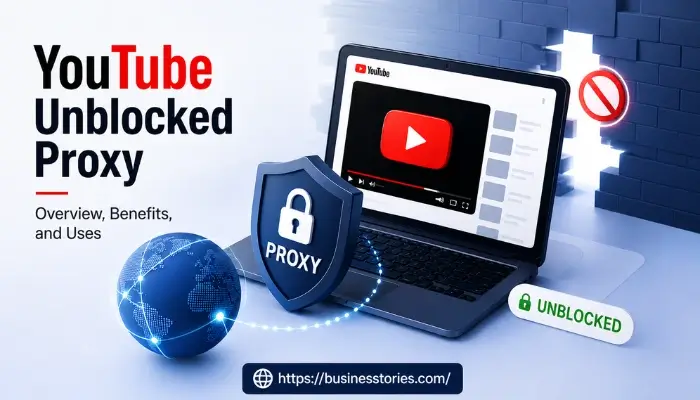
YouTube Unblocked Proxy: Overview, Benefits, and Uses
Have you ever tried to watch a YouTube video at school or work, only to see a frustrating “access denied” message? You are not alone. Millions of students, employees, and travelers face this problem daily. That is exactly where a YouTube unblocked proxy steps in. It gives you a simple, fast, and absolutely free way to access YouTube. No software installs, no technical skills needed.
A YouTube Unblocked Proxy acts as a bridge between your device and the video servers. It allows you to bypass strict content filters set by a network administrator. By using a free web proxy, you can effectively hide your original IP address. Make it appear as if you are browsing from a different location.
It not only helps to access YouTube when it is restricted. It also keeps your online activity private. For content creators who need to see how their videos appear in different regions. For casual viewers who want absolutely free access to global content, understanding how these proxies work is the first step toward digital freedom.
In this guide, you will learn what a YouTube proxy is. How does it work? why people use it? and what to watch out for. Whether you are a student or a remote worker, this article will help. Additionally, if you are a content creator managing your channel on the go, it is just as useful. Overall, it covers everything you need to know.
What is a YouTube unblocked proxy, and how does it work?
A YouTube unblocked proxy is a browser-based tool that acts as a go-between for your device and YouTube’s servers. Visit a proxy site and enter a YouTube URL. The proxy’s server fetches that video or page on your behalf. Then it sends the content back to your browser. Your network only sees a connection to the proxy, not to YouTube directly. So the block never gets triggered.
Think of it like asking a friend in another city to pick up something from a store you cannot visit. Your friend goes to the store, gets the item, and brings it back to you. The proxy server plays the role of that helpful friend.
A YouTube unblocked proxy works by sitting between your device and YouTube’s servers. When you send a request through it, the proxy fetches the content from YouTube on your behalf. It delivers it to your browser. The block on your network applies to your connection, not to every server worldwide.
How is it different from a VPN?
Many people confuse a proxy with a VPN. Both tools help you access YouTube on restricted networks. But they work differently. A VPN encrypts all the traffic on your device and reroutes everything through a secure server. A YouTube proxy, on the other hand, handles the specific browser request you submit. This makes a proxy much faster to set up. You do not need to install anything. You simply visit a website, paste the YouTube link, and you are done.
Unlike a VPN, which reroutes all device traffic, a web proxy handles the specific request you submit. This makes it faster to set up and easier to use on managed school or work devices where installing software is not an option.
How Does the IP Address Work?
Every device connected to the internet has an IP address. A unique identifier that tells websites where the request is coming from. When your school or office blocks YouTube, it blocks connections from your network’s IP range. A YouTube proxy replaces your IP address with its own server’s IP address. YouTube sees the proxy’s IP, not yours. As a result, the video loads without any issues.
This IP masking is the core reason why free web proxy tools are so effective at bypassing content filters. It is a lightweight solution that does not require any changes to your device settings.
Why Do Schools, Offices, and Countries Block YouTube?
To understand why a YouTube unblocked proxy is so useful, you first need to understand why YouTube gets blocked in the first place. There are three main layers of restriction that users commonly run into.
1. Network-Level Blocks by Administrators
Commonly, YouTube gets blocked at schools and workplaces. A network administrator can set up DNS filters, firewalls, or deep packet inspection tools to block specific websites. YouTube is often at the top of the blocklist because it consumes a lot of bandwidth. It can be a major distraction.
Workplace filtering is less about age protection and more about security, productivity, and liability. Unrestricted access to streaming, gaming, or social platforms during work hours can reduce employee focus. Consuming expensive bandwidth and impact performance for remote teams.
In schools, the situation is even more structured. Video services such as YouTube and SchoolTube are filtered at most schools. The United States Children’s Internet Protection Act (CIPA) requires schools that receive federal internet funding to use content filters. However, many schools go far beyond what the law requires. About 70% of both teachers and students said web filters get in the way of students’ ability to complete their assignments.
This is a critical insight that most articles miss. The very filters meant to protect students often end up blocking the educational content they actually need.
2. Government and ISP-Level Restrictions
Some countries restrict or completely block YouTube at the ISP level. In some countries, YouTube is completely blocked. Either through a long-term standing ban or for more limited periods of time. Such as during periods of unrest, the run-up to an election, or in response to upcoming political anniversaries.
For example, YouTube has faced restrictions. It complete blocks in countries like China, Russia, Turkmenistan, and others. A YouTube proxy routes your traffic through a server in an unrestricted region, allowing you to bypass these government-imposed barriers.
3. Geo-Restrictions on Specific Videos
Even if YouTube itself is not blocked, certain videos may not be available in your country due to licensing agreements or regional content laws. Travelers often encounter this problem when they try to watch content available back home. A free web proxy with servers in multiple regions can solve this by routing your request through the right geographic location.
Key Benefits of Using a YouTube Unblocked Proxy
Using a YouTube proxy comes with several real advantages. Here is a closer look at why so many users prefer it over other methods.
1. Completely Free to Use
Most reliable YouTube proxy services are absolutely free. There are no subscriptions, no hidden charges, and no registration required. This makes the tool accessible to everyone. From students on tight budgets to travelers who just need quick access to a video.
2. No Software Installation Needed
Unlike VPNs, you do not need to download or install anything. With a YouTube proxy, there’s no need to set up or install any additional software. It’s a free web proxy, and no registration or payments are required. You simply open your browser, visit the proxy site, and start watching. This is especially helpful on school-issued Chromebooks or work devices where you cannot install apps.
3. Works on Any Device
A browser-based YouTube proxy works on phones, tablets, laptops, and desktop computers. As long as your device has a browser and an internet connection, whether on school Wi-Fi, a hotel network, or a corporate firewall, the proxy should work.
4. SSL Encryption for Basic Security
Good proxy services use HTTPS and SSL encryption to protect the connection between your browser and the proxy server. The YouTube unblocked service leverages SSL encryption to safeguard your connection. While using a YouTube unblocked proxy, your data remains protected between your server and device. This prevents basic snooping on the data in transit.
5. Fast and Easy to Use
Because a proxy only handles one specific request at a time, not all your device traffic. It is often faster than a VPN for streaming videos. Purpose-built YouTube proxy services are optimized for video streaming. Which means less buffering and faster load times.
6. Bypasses Multiple Types of Content Filters
A good YouTube unblocked proxy can bypass DNS-based filters, IP-blocking systems, and school or workplace firewalls. A YouTube unblock proxy handles institutional filters just as effectively as government-level restrictions. This versatility makes it useful across many different situations.
Who Uses a YouTube Unblocked Proxy and Why?
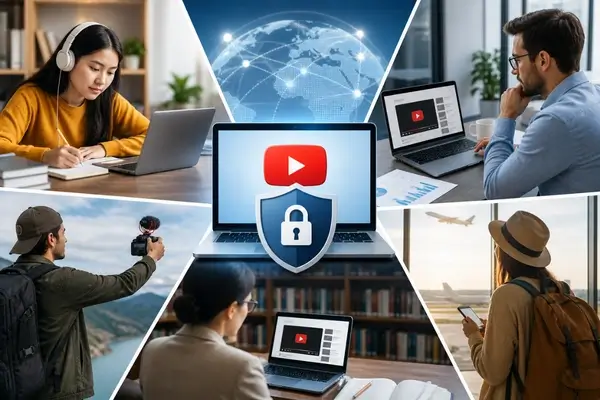
A YouTube proxy is not just for one type of user. It serves a surprisingly wide range of people, each with different needs. Here is a look at the most common real-world use cases.
1. Students Accessing Educational Content
Students are the largest group of proxy users. Many school networks block YouTube entirely or purely educational channels. US schools operate under the Children’s Internet Protection Act (CIPA), which mandates content filtering on federally funded networks. Most district-wide filters block YouTube entirely by default, even educational channels.
A student trying to watch a science tutorial, a history documentary, or a coding lesson often has no other option on school Wi-Fi. A YouTube proxy gives them instant access without needing admin approval.
2. Remote Workers and Corporate Employees
Many companies block video streaming platforms to save bandwidth. However, remote workers and marketing professionals often need YouTube access for legitimate work tasks — watching training videos, reviewing competitor content, or following industry news.
Professionals in corporate environments sometimes face YouTube blocks tied to bandwidth management policies rather than security concerns. A YouTube unblock proxy handles these cases just as well as institutional filters.
3. Content Creators Managing Their Channels
Travel vloggers, YouTubers, and content creators who travel internationally face a unique challenge. They may find themselves in a country where YouTube is restricted, but they still need to upload videos, reply to comments, or check their analytics.
A travel vlogger uploading footage from a country with restricted internet access may not be able to reach YouTube’s upload interface without a proxy or VPN. A browser-based proxy gives them a quick solution that works on any device, anywhere.
4. Researchers Accessing Geo-Restricted Videos
Academics and journalists sometimes need to access videos that are region-locked. A YouTube proxy routes the request through a server in an unrestricted country, giving researchers access to the content they need for their work.
5. Travelers Experiencing Unexpected Blocks
Many travelers do not realize that hotel Wi-Fi or local ISPs in certain countries restrict YouTube. Rather than struggling with VPN configurations mid-trip, a simple browser-based YouTube proxy gives immediate access with no setup.
How to Use a YouTube Unblocked Proxy Step by Step
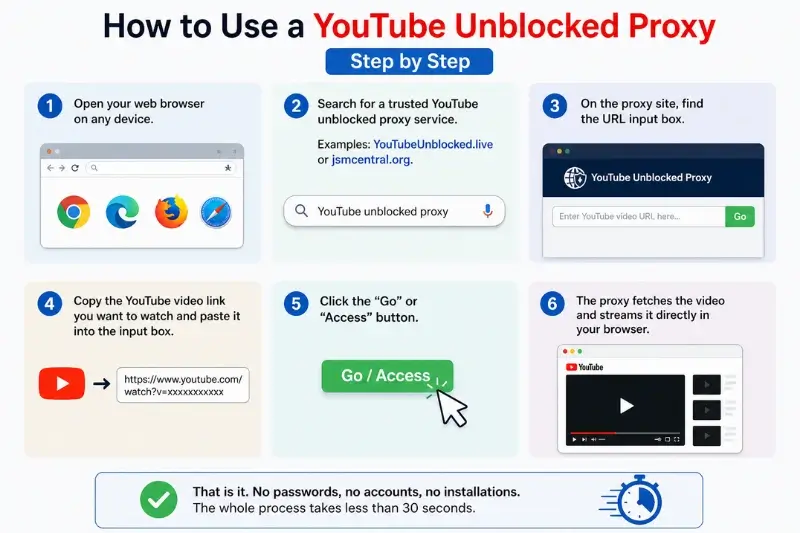
Using a YouTube proxy is much easier than most people expect. Follow these simple steps to get started.
Step 1: Open your web browser on any device.
Step 2: Search for a trusted YouTube unblocked proxy service. Examples include YouTubeUnblocked.live or jsmcentral.org.
Step 3: On the proxy site, find the URL input box.
Step 4: Copy the YouTube video link you want to watch and paste it into the input box.
Step 5: Click the “Go” or “Access” button.
Step 6: The proxy fetches the video and streams it directly in your browser.
That is it. No passwords, no accounts, no installations. The whole process takes less than 30 seconds. This simplicity is one of the biggest reasons why proxy tools remain the go-to solution for quick YouTube access on restricted networks.
Privacy and Safety Considerations
While a YouTube unblocked proxy is convenient, you should also understand its limitations. It is not a perfect privacy tool.
1. What a Proxy Can and Cannot Do
A proxy hides your activity from your local network. Your school’s or employer’s network administrator cannot see which specific YouTube videos you are watching. However, a YouTube unblocked proxy does not function as a full anonymity tool. Your ISP can see connections going to the proxy server’s address, even if it cannot see the specific YouTube URLs behind those requests.
Additionally, the proxy operator itself can technically log your activity. Always choose a service that clearly states a no-logs policy.
2. Choosing a Trustworthy Proxy
Not all free web proxy services are equal. Some may inject ads, reduce video quality, or, in the worst cases, collect your data. Stick to well-known, reputable services. Check for HTTPS in the proxy’s URL. Avoid proxies that ask for personal information.
3. Legal and Policy Considerations
In most countries, using a web proxy for personal access is legal. Using it to bypass your school’s or employer’s acceptable use policy may have consequences within that institution. Always review the rules of your specific network before using a proxy. Also, note that a browser extension that acts as a proxy may have different privacy risks compared to a dedicated proxy website. Extensions can access more of your browser’s data.
YouTube Proxy vs. Other Unblocking Methods
It helps to compare a YouTube proxy to other popular methods for accessing blocked content.
| Method | Setup Time | Cost | Privacy | Works Without Install |
| YouTube Proxy | Seconds | Free | Moderate | Yes |
| VPN | Minutes | Often Paid | High | No |
| Browser Extension | Minutes | Varies | Low–Moderate | No |
| Mobile Hotspot | Seconds | Uses Data | High | Yes |
VPNs offer the strongest privacy and bypass capability. But they require installation and configuration. On managed school or office devices, that’s often not possible. A YouTube unblock proxy works entirely in the browser with no software required, which is why it remains the practical first choice for quick access on restricted networks. Mobile hotspots bypass the local network entirely. YouTube uses roughly 3 GB per hour at 1080p, so data consumption is a real concern.
For most everyday users who just want to access YouTube quickly, a proxy is the most practical choice. For users who need full privacy across all their online activity, a VPN is a better long-term investment.
Conclusion
A YouTube unblocked proxy is one of the most accessible and practical tools available today for anyone locked out of YouTube. Whether you are a student trying to watch a tutorial on school Wi-Fi, a content creator working from a restricted country, or even a remote worker needing a training video on a corporate network, a YouTube proxy helps. As a result, it gets the job done quickly. Moreover, it is easy to use. Best of all, it is absolutely free.
The tool works by replacing your IP address with the proxy server’s IP, so content filters and geographic restrictions never see your real connection. It requires no downloads, no accounts, and no technical knowledge. You simply visit a proxy site, paste your YouTube URL, and start watching.
That said, always use a trusted proxy service and be aware that it does not offer complete anonymity. For sensitive browsing, pair it with a VPN or use a no-logs proxy with SSL encryption.
The bottom line: a YouTube proxy is the fastest, simplest way to regain access to the world’s largest video platform. Wherever you are, on whatever device you have. Try a reputable YouTube unblocked proxy today and take back control of your online activity.
FAQs about YouTube Unblocked Proxy
Q1. Is a YouTube unblocked proxy safe to use?
Most reputable proxy services use SSL encryption to protect your connection. Always choose a trusted provider with a clear no-logs policy. Avoid proxies that request personal information or lack HTTPS in their URL.
Q2. Can I use a YouTube proxy on a school Chromebook without installing anything?
Yes. A browser-based YouTube proxy works directly in any web browser, including Chrome on school-issued Chromebooks. You do not need admin permissions or any software downloads to access YouTube through a proxy.
Q3. Will a free web proxy slow down my YouTube streaming?
It depends on the proxy server’s location and current traffic load. Purpose-built YouTube proxy services are optimized for video streaming. Generally offer low latency. Choosing a proxy with servers close to your location helps reduce buffering.
Q4. Can content creators use a YouTube proxy to manage their channels from restricted regions?
Yes. Content creators traveling to countries with YouTube restrictions can use a YouTube proxy to upload videos, check analytics, and respond to comments, all from a standard web browser, with no VPN configuration needed.
Q5. Is using an unblocked YouTube proxy legal?
In most countries, using a web proxy for personal access to YouTube is legal. Bypassing your school’s or employer’s network filters may violate their acceptable use policy. Review local laws and institutional rules before using any proxy service.

Tabassum Shaik is an Author, Researcher, and SEO Specialist with over 8 years of experience creating informative content on business, startups, entrepreneurship, marketing, technology, and digital trends. She specializes in researching industry trends and transforming complex topics into practical, easy-to-understand insights. Her goal is to help readers stay informed, learn new ideas, and make better business decisions.