Picture this. Your company has a 40-page user guide, and now it needs to ship in five languages. The deadline is next month. So how do translators keep every term the same across thousands of sentences? In most cases, the answer is CAT tools.
CAT stands for computer-assisted translation. However, it does not mean a robot does the work. Instead, these tools help human translators work faster and stay consistent. In fact, a ProZ survey of over 3,000 full-time translators found that 93% of CAT tool users say their tool makes them more efficient.
In this listicle, you will learn what CAT tools are and how they work step by step. You will also see how they differ from machine translation. Plus, you will get a simple plan to pick one and start using it.
What Are CAT Tools? A Simple Definition
CAT tools are software that helps people translate text. Think of them as a smart desk for translators. You still write the translation yourself. But the tool remembers your work, checks it, and suggests words you have used before.
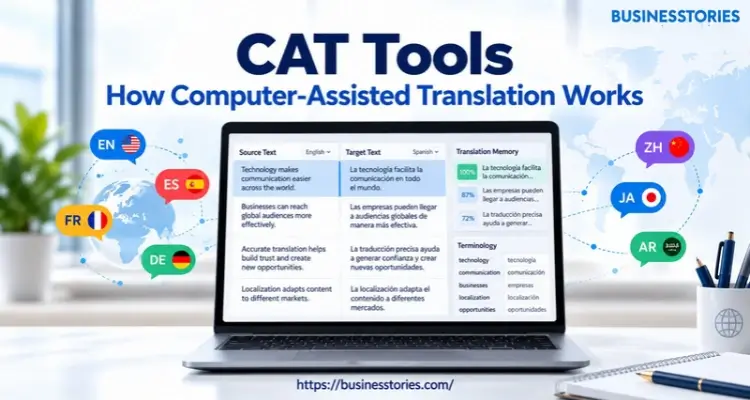
Most tools share a few basic parts.
- First, there is a translation editor. The source text sits on one side, and your translation goes on the other.
- Next, there is a translation memory that saves every sentence you translate.
- Then there is a term base, which is a list of approved words.
- Finally, most tools run quality checks that flag errors before you deliver.
A Short History of CAT Software
CAT tools are older than many people think. For example, Trados started in Stuttgart in 1984 as a small translation firm. By 1990, it had launched its first software, a term tool called MultiTerm. Then, in 1992, the first version of its Translator’s Workbench came out. That product made translation memory famous.
Soon after, major clients began to adopt the product. The European Commission bought hundreds of licenses. Later, in 1997, Microsoft began to use Trados for its own work and bought a 20% stake in the firm.
Today, you have many more choices. Well-known options include Trados Studio, memoQ, Phrase, and the free, open-source OmegaT. Meanwhile, many newer tools run fully in the cloud, so teams can work together in a browser.
Who Uses CAT Tools Today?
Freelance translators are the biggest group of users. However, they are not the only ones. Agencies use them to run large projects. Likewise, software firms use them to translate apps and websites. Even small firms use them when they start to sell abroad.
The wider market is big, too. According to Nimdzi, language services were worth about $71.7 billion in 2024. Nimdzi also expected the figure to reach $75.7 billion in 2025. So translation is not a niche task. Instead, it is a major global industry.
Unique insight: Most guides call CAT tools “software for translators.” Yet for a business, the real prize is the data the tool builds. Your translation memory is an asset you own. So if you ever switch vendors, ask for your memory as a TMX file. That standard file lets you take years of past work with you.
How CAT Tools Work: 7 Core Features
So, what occurs when you open a file in a CAT tool? The process follows a clear path. Here are the seven core features that make it work.
1. File Filtering
First, the tool reads your file. It might be a Word document, a web page, or app text in a format like JSON or XML. The tool then hides the code and layout. As a result, you only see the words you need to translate. That way, you won’t break a web page by mistake.
2. Segmentation
Next, the tool splits the text into small pieces called segments. Usually, each segment is one sentence. Because the pieces are small, the tool can match them to past work with ease.
3. Translation Memory (TM)
The TM is the heart of every CAT tool. Each time you confirm a segment, the tool saves the source and the translation as a pair. Later, when the same sentence shows up, the tool fills it in for you.
There are two main kinds of matches. A 100% match is an exact repeat. A fuzzy match is close but not the same, such as an 85% match. In that case, you only edit the part that changed.
4. Termbases and Glossaries
Then there is the term base. It stores approved terms, such as product names or legal phrases. When a term appears, the tool shows the right translation. So everyone on the team uses the same words.
5. Concordance Search
Sometimes you only recall a phrase, not a full sentence. In that case, a concordance search helps. You type a word, and the tool shows every past sentence that contains it.
6. Machine Translation Suggestions
Today, most tools also plug into machine translation engines. For example, a segment with no memory match can receive an AI draft. Thereafter, the translator checks it and fixes it.
7. Quality Assurance (QA) Checks
Finally, the tool runs checks before you deliver. It flags missing numbers, broken tags, extra spaces, and terms that don’t match the term base. In short, it catches the small slips that tired eyes miss.
Does all this functionality actually save time? Most users think so. In the ProZ survey, the largest group of users reported gains of 20% to 30%.
Pro tip: Segmentation rewards steady writing. If your English text says “Click Save” in one place and “Press the Save button” in another, the memory sees two different sentences. So write the same idea the same way, and your match rate will climb.
CAT Tools vs Machine Translation vs TMS: Key Differences
These three terms are often confused. However, each one does a different job. So let’s break them down.
CAT Tools vs. Machine Translation
Machine translation (MT) is software that translates on its own. Google Translate and DeepL are common examples. You paste text in, and a full translation comes out in seconds. No human needs to touch it.
CAT tools work differently. Instead of replacing the translator, they support one. The human makes the final call on every sentence. That’s why CAT tools are the norm for legal, medical, and marketing work, where errors cost real money.
Still, the line is blurring. Nowadays, most CAT tools include MT as one feature. So a translator might get an MT draft, check it against the memory, and then polish it. People call this mix machine translation post-editing, or MTPE.
Does MT always help? Not always, but research suggests it often does. For instance, a 2008 study by Ana Guerberof found that translators worked faster when editing MT output than when editing 80% to 90% fuzzy matches. Results depend on the engine, the subject, and the language pair.
CAT Tools vs Translation Management Systems (TMS)
A translation management system (TMS) runs the whole project. It assigns work, tracks deadlines, and links to your website or code. By contrast, a CAT tool is where the actual translating happens.
Here is an easy way to remember it. The TMS is the project manager’s desk. Meanwhile, the CAT tool serves as the translator’s workspace. Many modern platforms, such as Phrase and Smartling, now combine both in one product.
Quick Comparison
| Feature | CAT Tool | Machine Translation | TMS |
| Who translates? | A human, with help | Software | Not its main job |
| Main goal | Speed and consistency | Instant output | Project control |
| Best for | High-stakes text | Fast, low-risk text | Large, ongoing programs |
Unique insight: AI is changing how translation is priced, not just how it is done. Nimdzi found that only 15.1% of language providers still think per-word pricing works. Because memory and MT cut the effort per word, many vendors may move to hourly or project rates. So ask about the pricing model before you sign a deal.
How to Choose and Start Using a CAT Tool in 5 Steps
Ready to try one? The positive news is that you don’t need to be an expert. Just follow these five steps.
Step 1: Define Your Needs
First, ask who will use the tool. A solo freelancer needs something very different from a 20-person marketing team. Furthermore, list the file types you handle most, such as Word, InDesign, or JSON.
Step 2: Pick Desktop, Cloud, or Hybrid
Next, decide where the tool should live. Desktop tools like Trados Studio work offline and suit heavy users. On the other hand, cloud tools run in a browser, so teams can work at the same time. Meanwhile, hybrid tools let you do both.
Step 3: Start With a Free Trial
Then test before you buy. OmegaT is free and open-source, so it is a low-risk place to learn the basics. Most paid tools, such as memoQ and Phrase, also offer trials. Try one real file, not a demo, to see how the tool handles your content.
Step 4: Build Your First Translation Memory
After that, feed the tool your previous work. Most CAT tools have an alignment feature. It pairs old source files with their translations and turns them into a memory. As a result, you get matches from day one instead of starting from zero.
Step 5: Create a Simple Termbase
Finally, list your 50 most important terms. Include brand names, product names, and words that must never change. Then add the approved translation for each one. This small step saves a lot of rework later.
Common Mistakes to Avoid
Many beginners make the same errors. For example, they trust every 100% match without reading it. Yet a sentence can be right in one place and wrong in another. Similarly, some teams skip the term base and fix the same word again and again.
Also, many people buy more tools than they need. In fact, the ProZ survey found that 33% of CAT tool users own at least one tool they never use. So start with one tool, learn it well, and grow from there.
Final Thoughts: Why CAT Tools Matter
So, what should you take away? In short, CAT tools help people translate faster without giving up control. They don’t replace human translators. Instead, they remove the busywork so people can focus on meaning.
Let’s recap. First, CAT tools split text into segments and save each one in a translation memory. CAT tools then use exact and fuzzy matches to reuse earlier translations. On top of that, termbases keep your words consistent, and QA checks catch small errors.
Meanwhile, machine translation now sits inside most tools as a handy first draft. Also, keep the three tool types straight. A CAT tool is where translation happens. MT translates on its own. A TMS runs the whole project.
For businesses, there is one more point. Your translation memory is a long-term asset. So the more you translate, the more you save on the next job. Plus, steady source writing makes that asset even more useful.
Here is your next step. Pick one real file. Then load it into a free tool like OmegaT or a trial of a paid tool. Next, build a small term base, align a few old files, and count your matches. You will learn more in one afternoon than in a week of reading.
FAQs About CAT Tools
1. What are CAT tools, and how do they help professional translators?
CAT tools are software that support human translators. They save past work in a translation memory, suggest matches, and check for errors. As a result, translators work faster and keep their terms consistent across large projects.
2. Is a CAT tool the same thing as machine translation software today?
No. Machine translation creates a full draft on its own. In contrast, a CAT tool supports a human translator. However, many CAT tools now include machine translation as one feature, so the two often work together.
3. What is a fuzzy match in translation memory, and how does it work?
A fuzzy match is a past sentence that is similar but not identical to the new one. For example, an 85% match may differ by one word. So the translator only edits the part that changed.
4. Are there any free CAT tools that beginners can download and use?
Yes. OmegaT is a free, open-source CAT tool that works on Windows, Mac, and Linux. Furthermore, most paid tools, such as memoQ and Phrase, offer free trials, so beginners can test before they pay anything.
5. Can small businesses use CAT tools to cut their translation costs?
Yes. Translation memory reuses past work, so repeated text costs less to translate over time. Plus, a term base keeps brand terms consistent. That’s why small firms that publish often in other languages usually see savings.

Tabassum Shaik is an Author, Researcher, and SEO Specialist with over 8 years of experience creating informative content on business, startups, entrepreneurship, marketing, technology, and digital trends. She specializes in researching industry trends and transforming complex topics into practical, easy-to-understand insights. Her goal is to help readers stay informed, learn new ideas, and make better business decisions.